BACK TO HOME
ROITECH · INTERNSHIP
Internship · Enterprise UX · 2025
Clarity for the People
Who Hire People.
An internal enterprise tool that needed a UX overhaul.
ROLE
UI/UX Designer
DURATION
Nov – Dec 2025
TYPE
Internal Enterprise Tool
TEAM
1 PM · 3 Devs · 1 UX Designer
STATUS
Live
01 ABOUT THE PROJECT
What was this system?
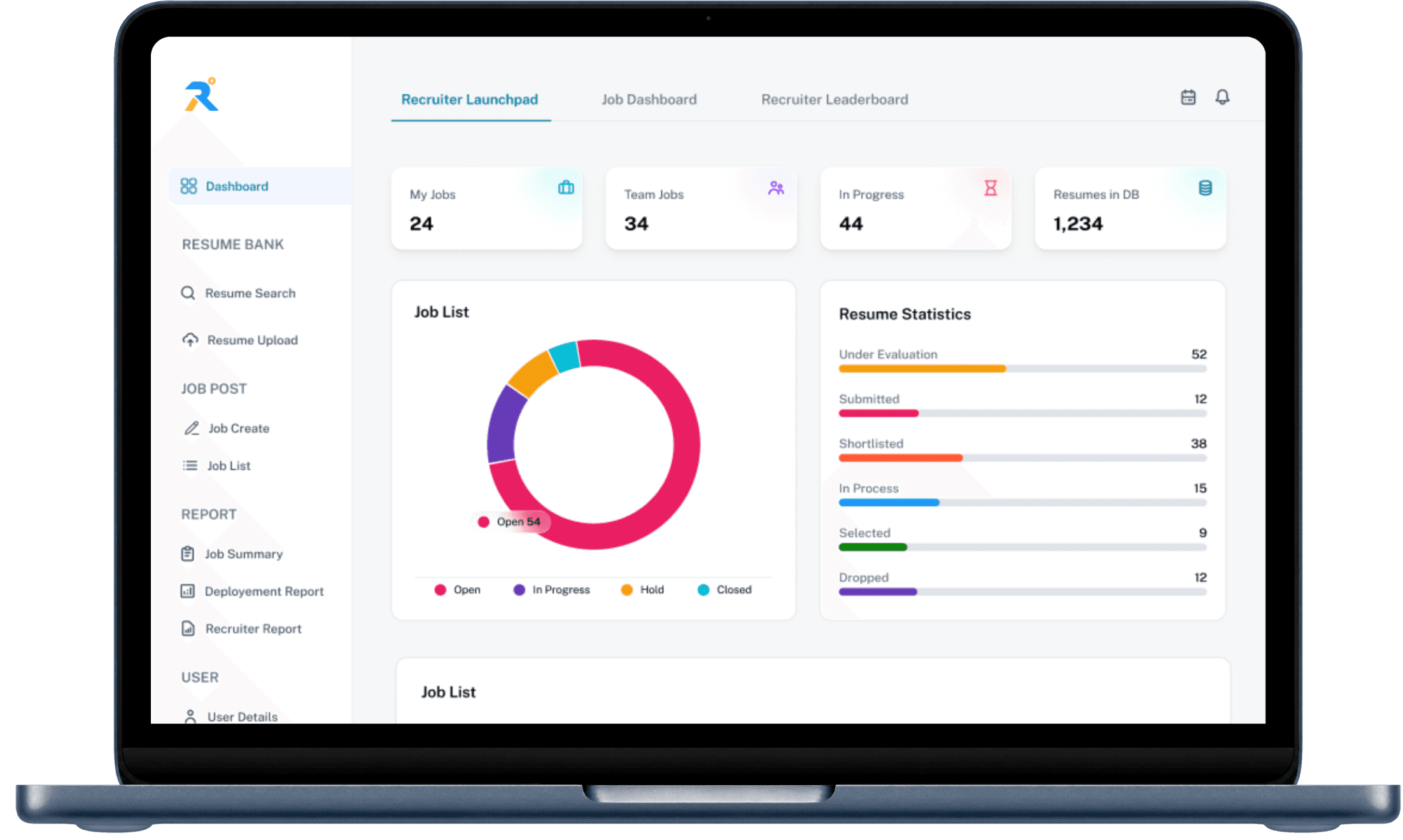
RoiTech is a SAP partner specialising in enterprise applications. Internally, their hiring teams and managers relied on a Recruitment Management System (RMS) with ATS capabilities to track candidates, manage job listings, monitor recruiter performance, and oversee deployments.
The system had everything recruiters needed. It just made them work too hard to find it.
02 ABOUT THE PROBLEM
Built to function, not to think.
The RMS had been built incrementally using developer-led component libraries. Nobody had sat down and asked: how does a recruiter actually use this? The result was a system where everything existed, but nothing felt intentional.
I spoke with the recruiters and hiring managers who used it daily. What came back was consistent, the system was exhausting to use. Not because it was broken, but because every screen demanded too much cognitive effort just to find what mattered.
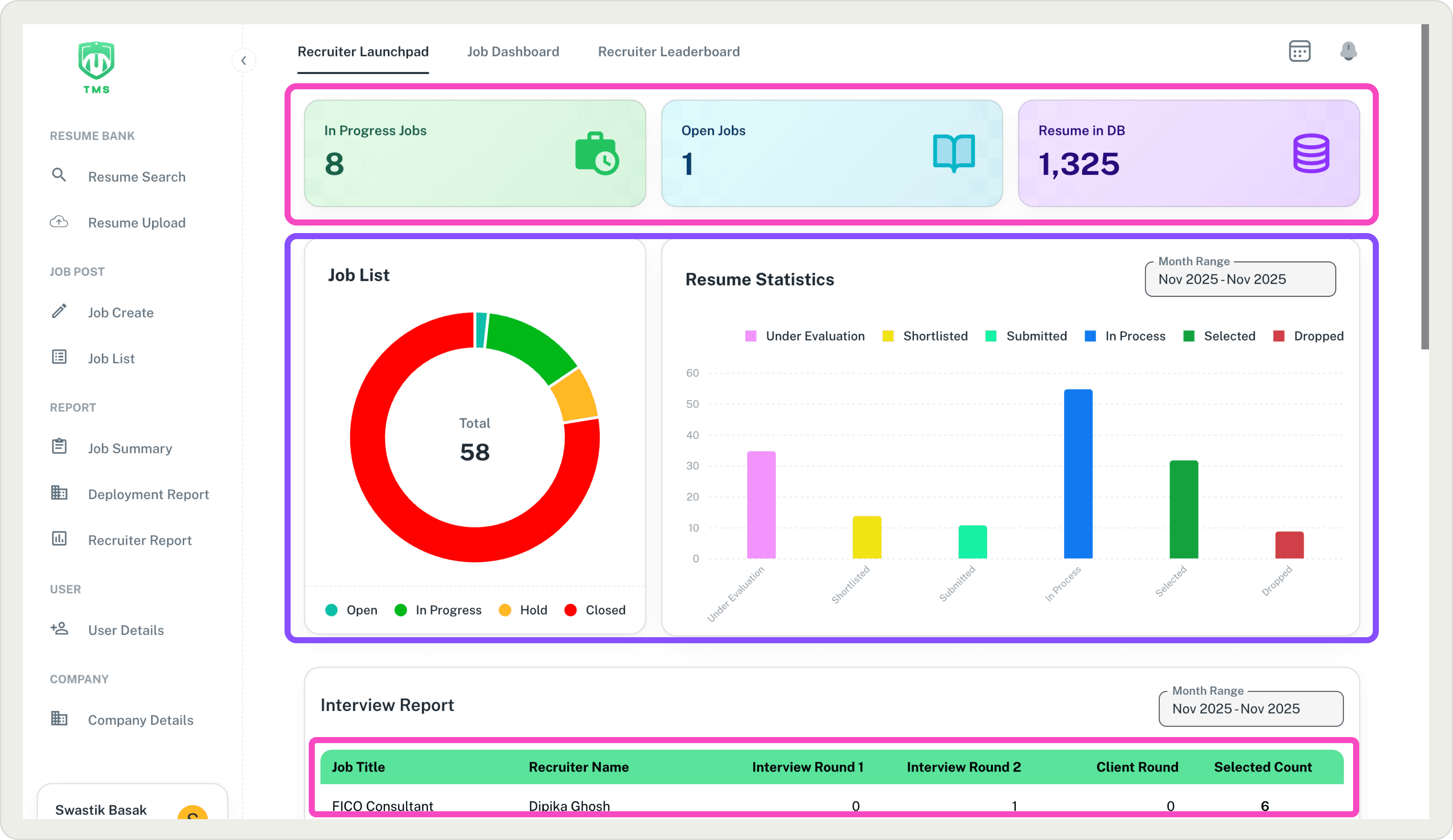
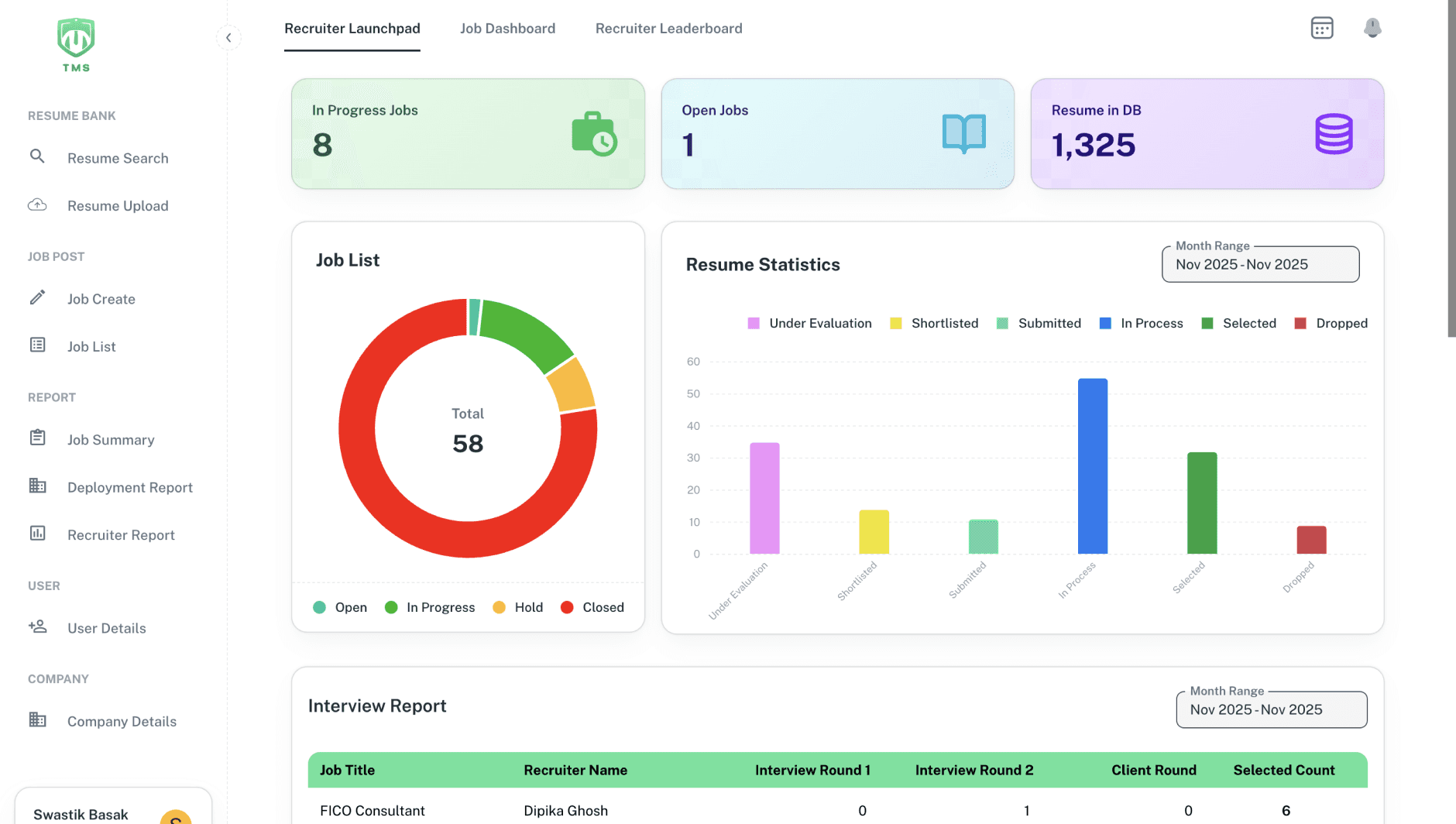
The original dashboard — saturated colours, no hierarchy, everything competing for attention.
01
Visual overload — oversaturated colours, inconsistent badge styles, and competing elements. Nothing told you where to look first.
02
No information hierarchy — job lists, statistics, reports, and candidate data were all given equal weight. Scanning was slow, decisions were slower.
03
Cluttered candidate cards — skills, contact info, CTCs, tags, and actions dumped into each card with no structure or breathing room.
04
Inconsistent components — buttons, tables, status indicators, and navigation patterns varied across screens with no system holding them together.
Before — Dashboard
After — Dashboard
03 MY APPROACH
I started with the recruiters, not the screens.
Before opening Figma, I talked to the people who used this system every day. Recruiters and hiring managers told me the same thing in different ways: "I know the information is there, I just can't find it fast enough”
That became the real design problem. Not the colours. Not the components. The cognitive load of a high-frequency, high-stakes workflow where every second of friction adds up across dozens of candidates a day..
"Make the right information visible at the right moment, without making the user work for it."
From there, I audited every screen — identifying visual, layout, UX, and data clarity issues before touching Figma. The before after annotations you see in this case study came directly from that audit.
02
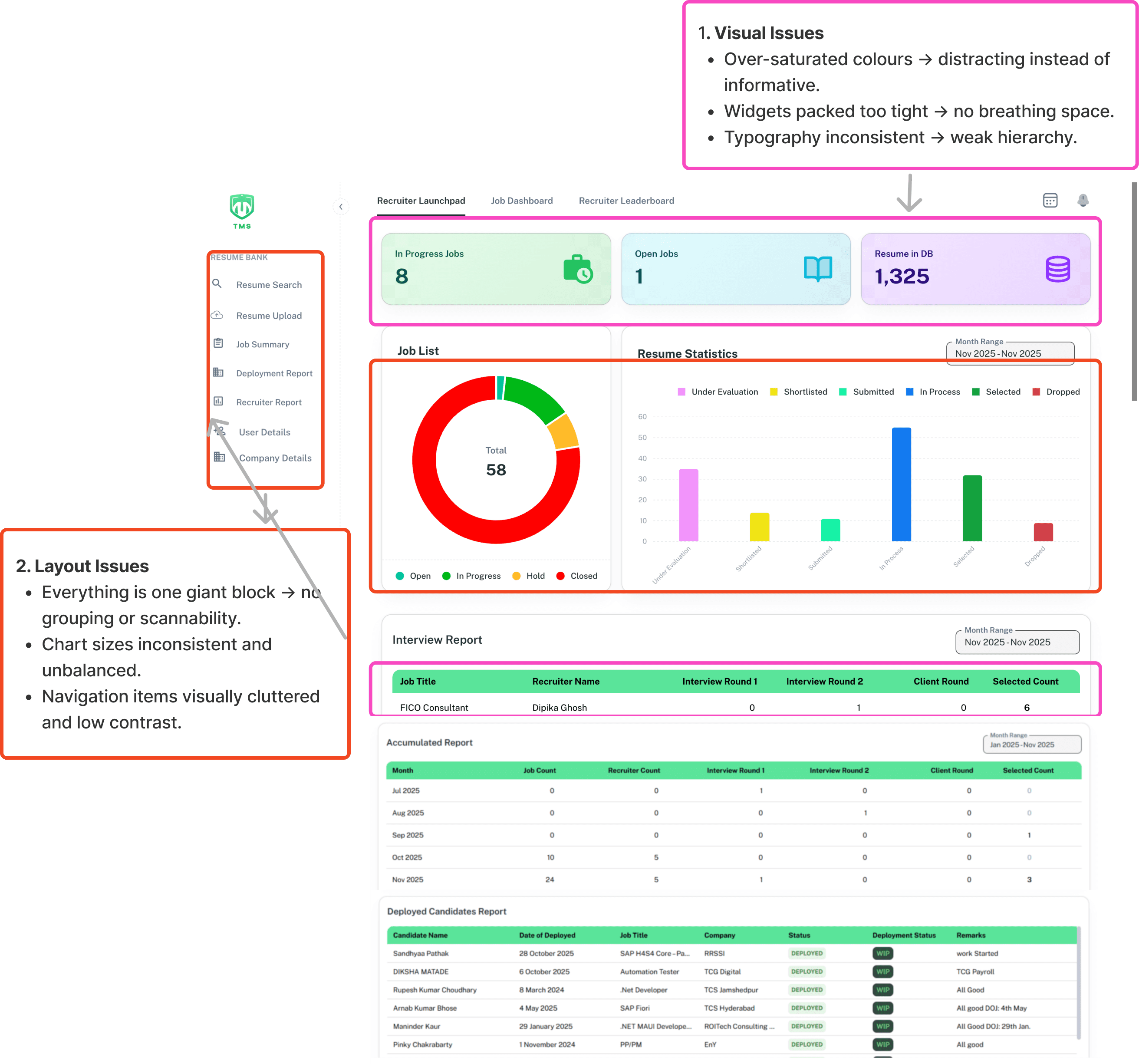
VISUAL ISSUES
H8 — Aesthetic & Minimalist
Over-saturated stat cards compete at equal weight
Four high-chroma colours used simultaneously — no primary focal point, cognitive overload on page load
Typography carries no hierarchy signal
Label, value, and unit text share identical weight — users cannot skim headings from data
Widgets packed with zero breathing space
No padding rhythm between sections — the dashboard reads as a single undifferentiated block





3 competing chroma values — no hierarchy
6 chart colours, no focal point
02
LAYOUT ISSUES
H4 — Consistency & Standards
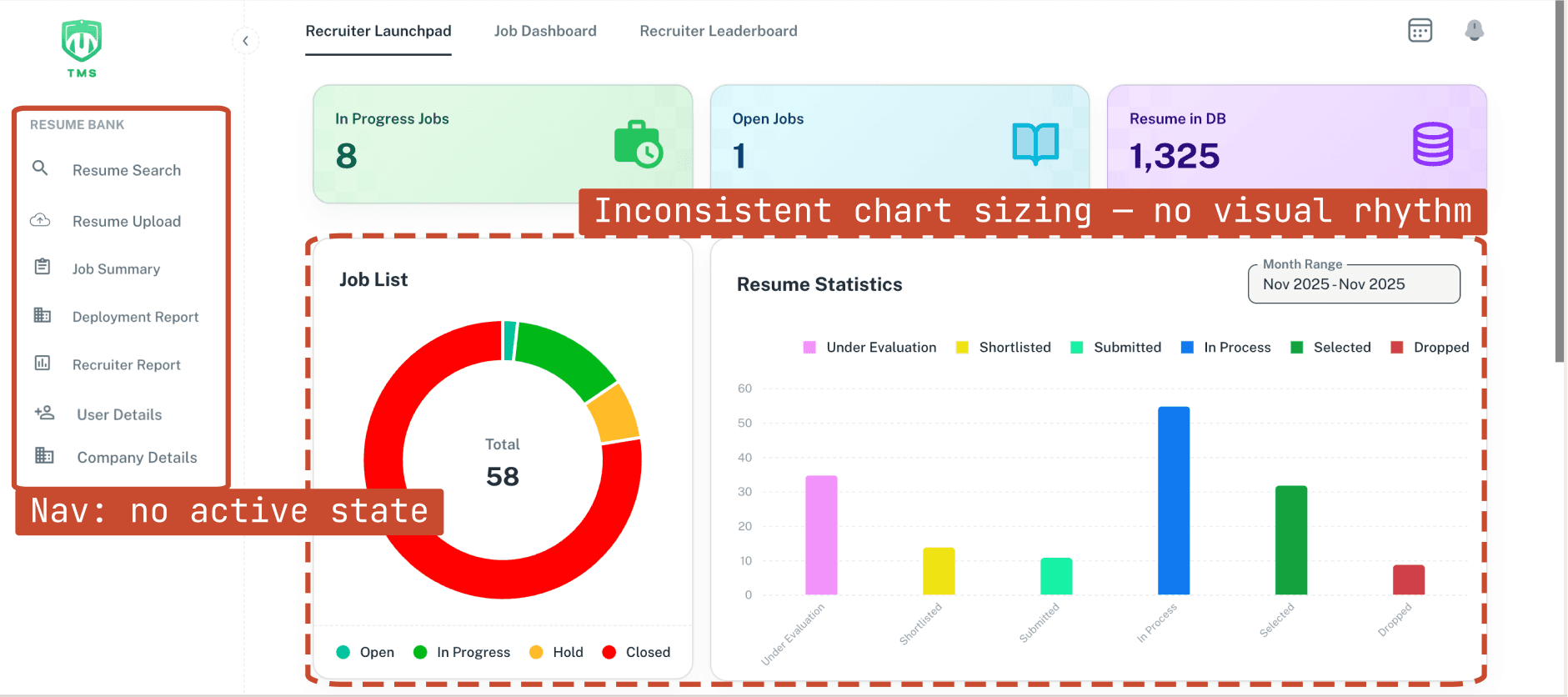
No spatial grouping — one undifferentiated wall of content
Without containment zones, users cannot chunk the page. Every element reads at equal priority (H8)
Active nav state indistinguishable from inactive
Selected and unselected sidebar items share identical visual weight — users must read every label to orient (H6)
Donut and bar chart sized inconsistently
Unequal chart containers break grid consistency — the eye bounces rather than scanning a structured layout
04
DATA CLARITY ISSUES
H1- Visibility of System Status
All status badges use identical green — states are invisible
In Progress, Selected, and Dropped share the same colour — pipeline status cannot be scanned at a glance (H1)
All data is exposed at once — no progressive disclosure
Users are forced to process 9 columns simultaneously, even when only a few are relevant — slowing scanning and increasing cognitive load
Bright green header row outweighs the data rows it organises
A high-saturation structural element draws more visual weight than the content it labels, inverting hierarchy (H8)
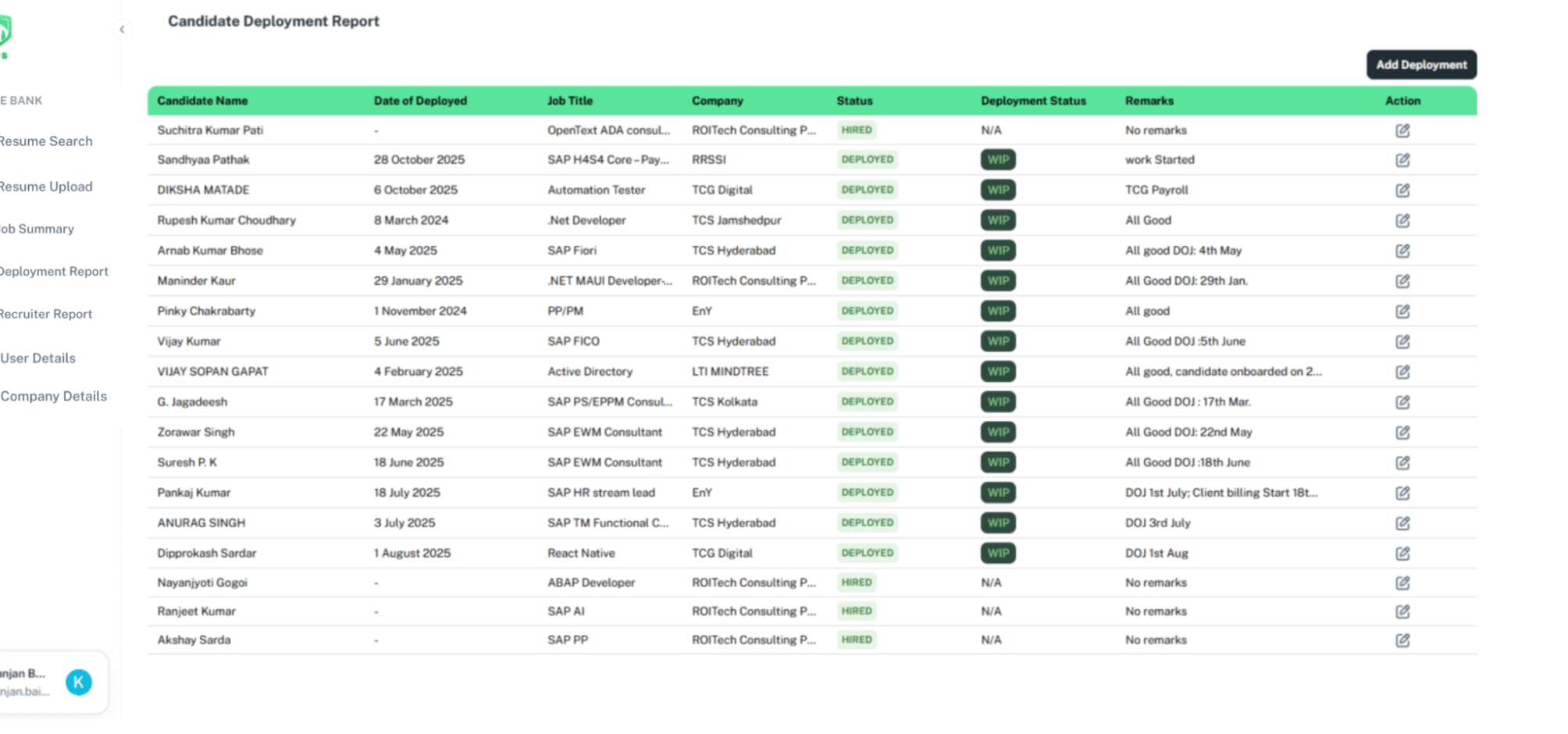
All statuses identical green — undifferentiated (H1)
Bright green header row outweighs the data it organises (H8)
All data is exposed at once — no progressive disclosure (H7)
03
UX ISSUES
H6- Recognition over Recall
Filter panel occupies equal space to results
Filters are a secondary tool — giving them proportional dominance inverts the content hierarchy (H8)
No separation: global nav → local nav → content
Three navigation levels share identical visual treatment — users cannot build a spatial model of the app
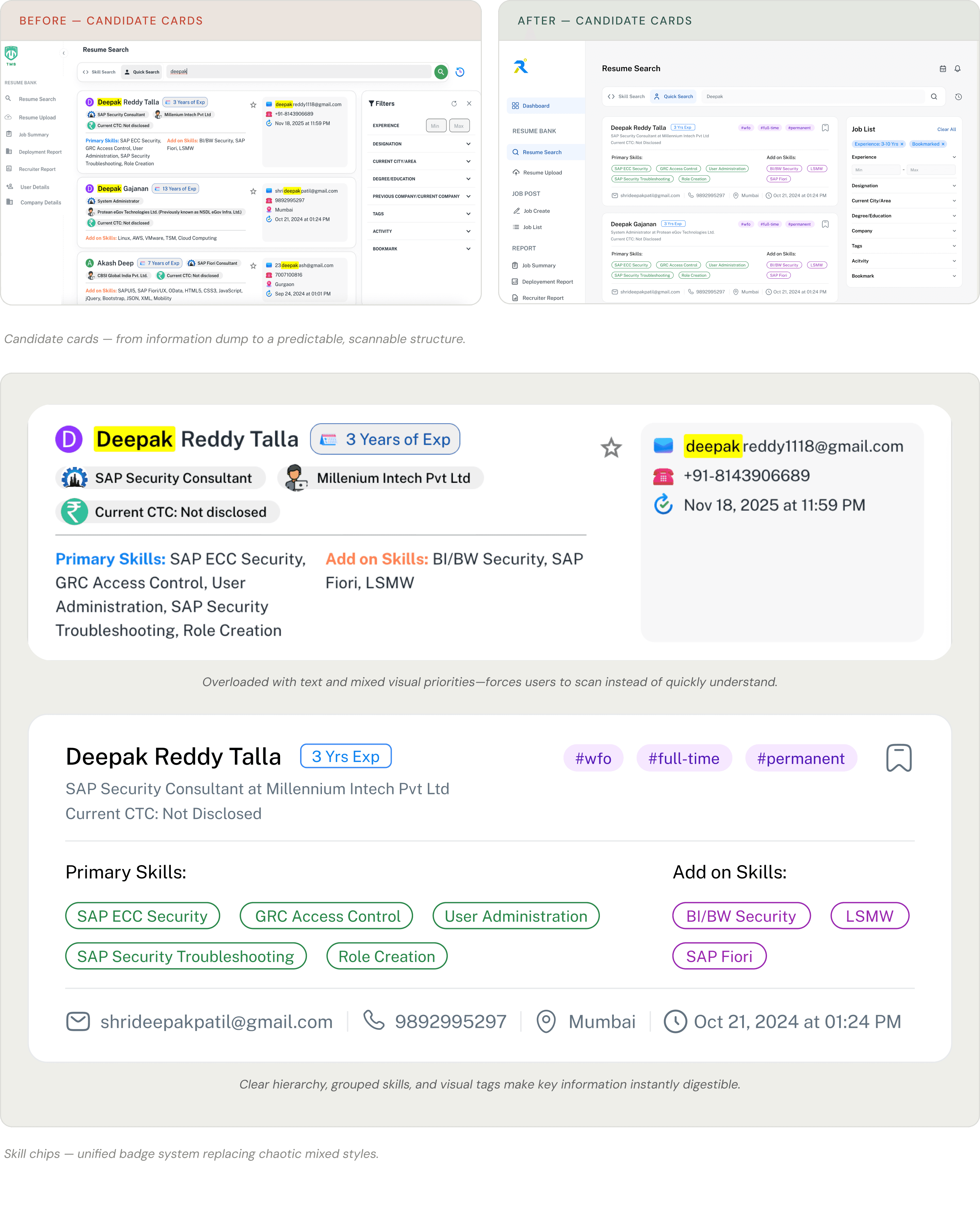
Candidate cards have no predictable information template
Identity, skills, tags, meta info are at the same visual layer — recruiter must re-parse every card from scratch (H6)
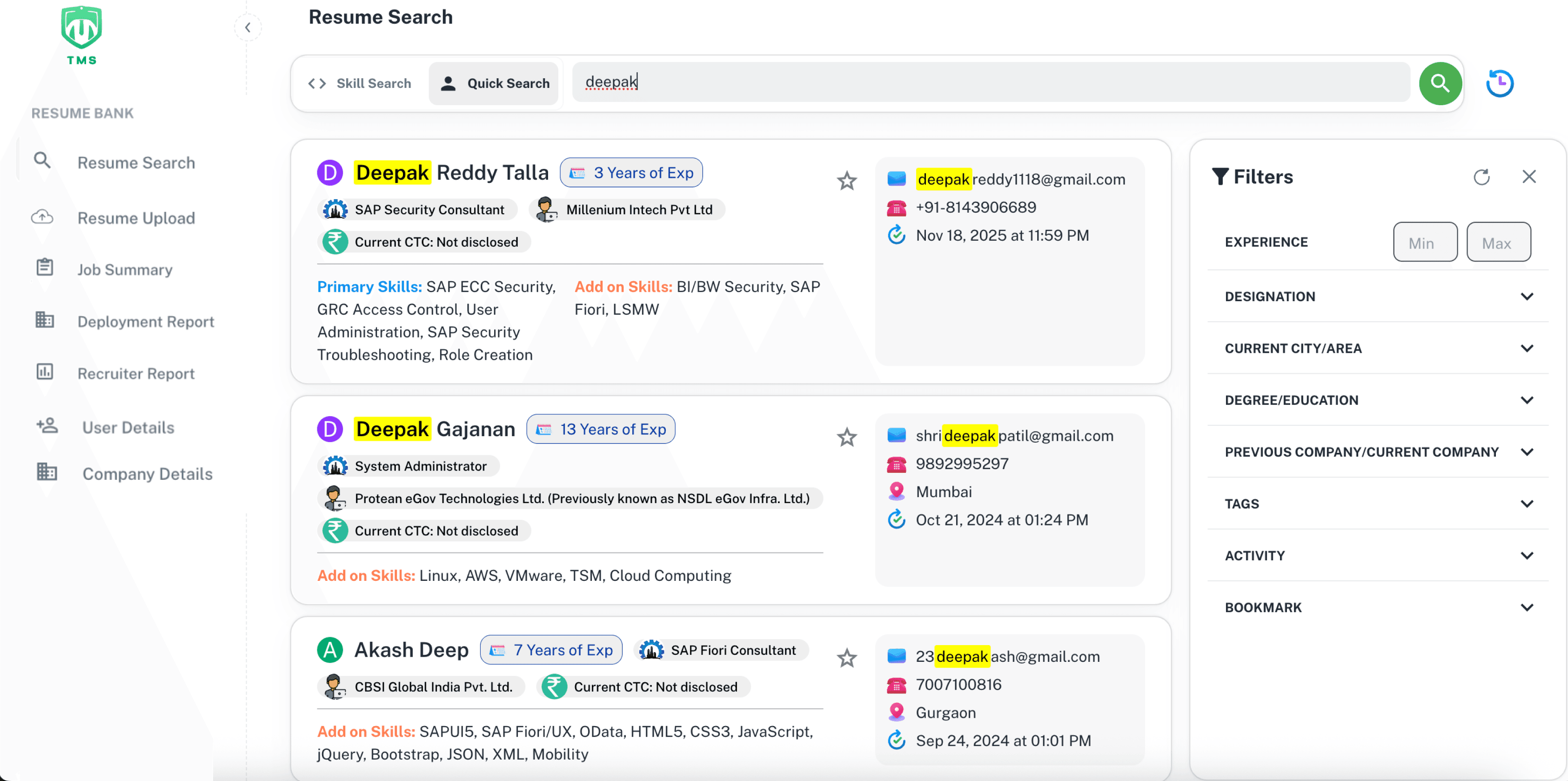
Filter panel dominates results (H8)
No nav hierarchy — global = local = content
Information overload with no hierarchy.
04 THE WORK
Everything from the dashboard to the candidate cards.
DASHBOARD
Restructuring the most-used screen
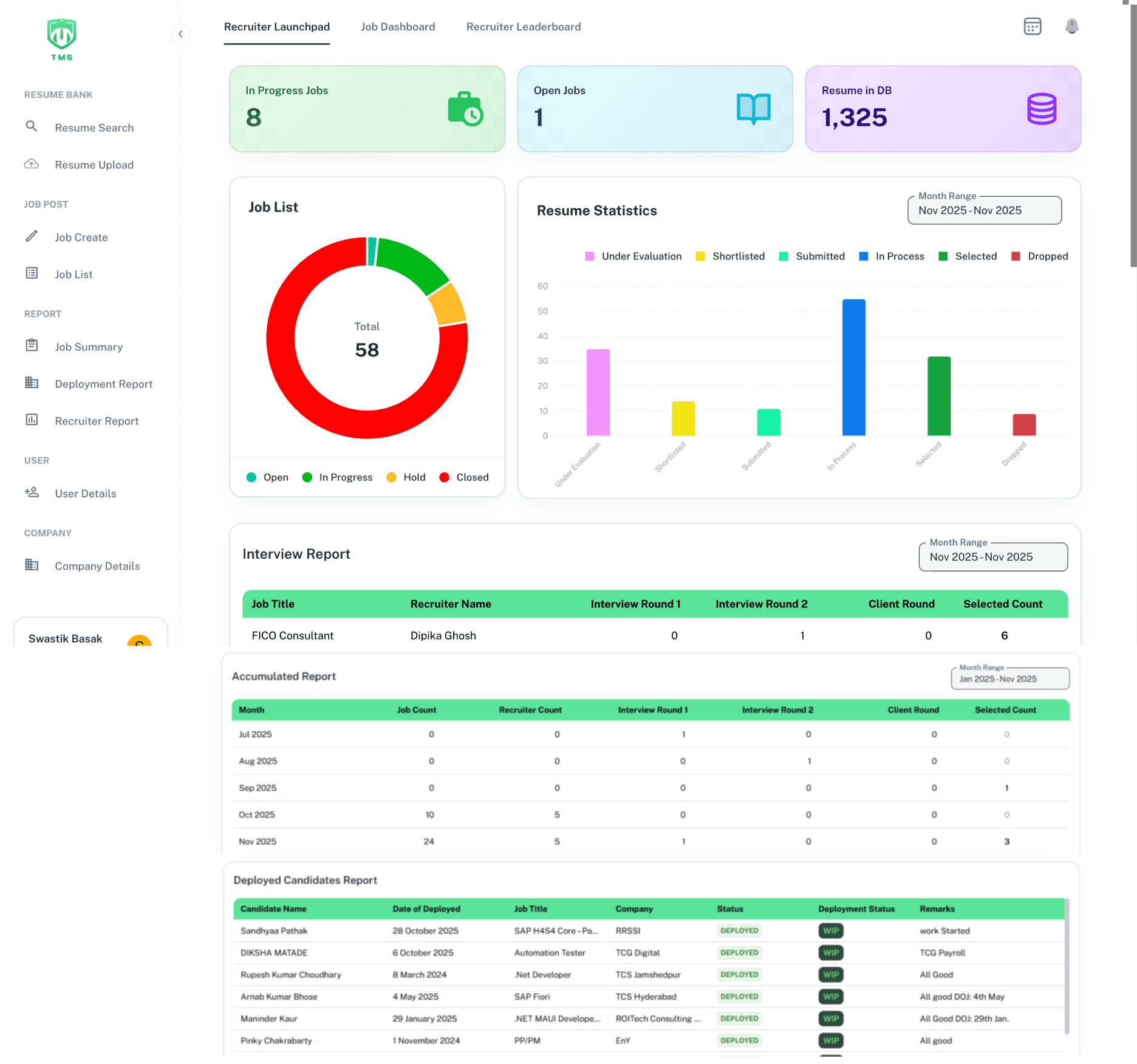
The dashboard was the most used screen and the most broken. The old version crammed metrics, charts, job lists, and reports into one undifferentiated wall. A recruiter opening the app had no clear starting point.
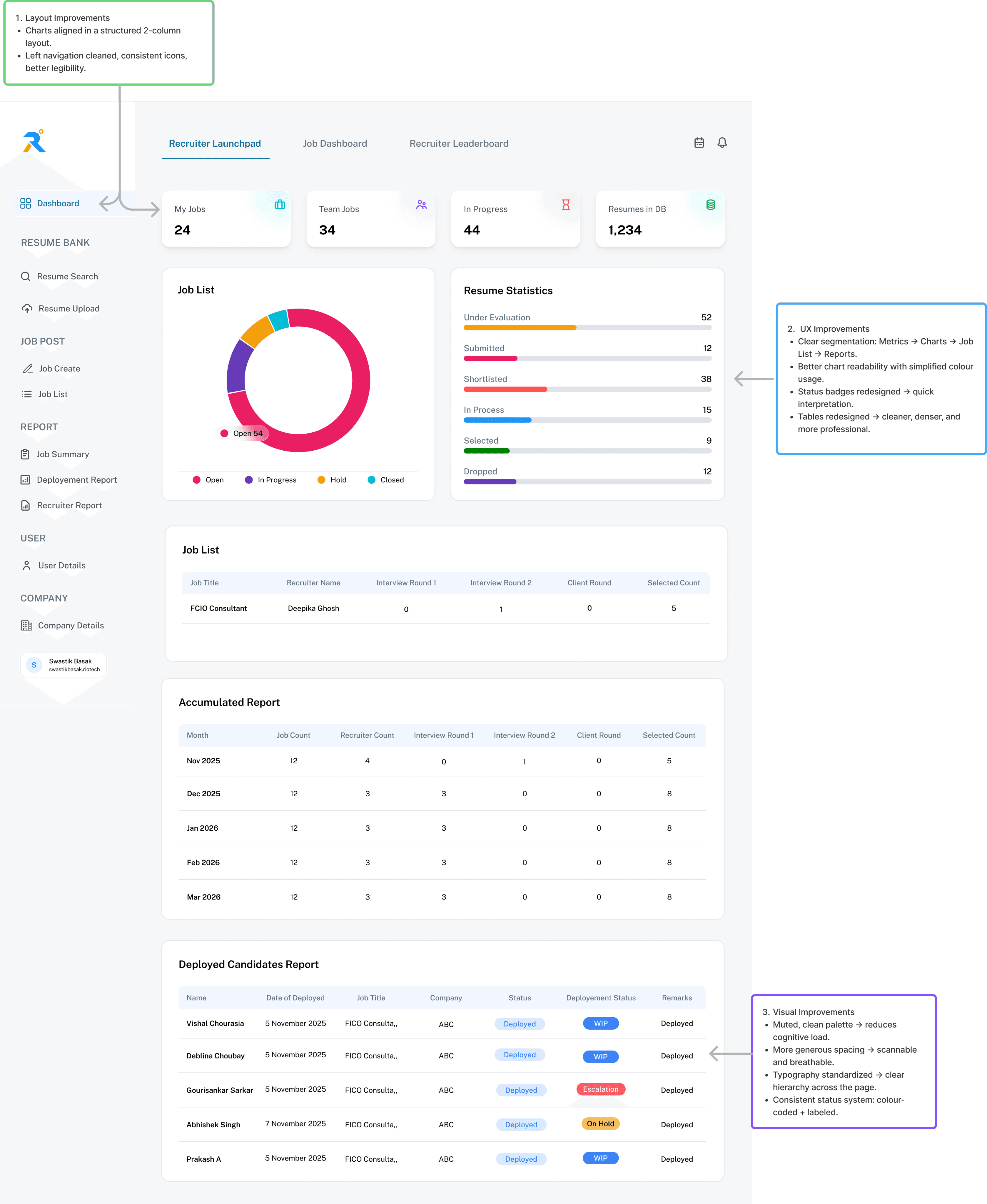
I restructured around a simple hierarchy: top-level KPIs first, then charts, then detailed tables. Status badges were redesigned for quick interpretation. Tables were cleaned up — denser, more professional, easier to scan.
Before — Dashboard
After — Dashboard
Job List
Open 54
Open
In Progress
Hold
Closed
Resume Statistics
Under Evaluation
52
Submitted
12
Shortlisted
38
In Process
15
Selected
9
Dropped
12
Job List
Job Title
FCIO Consultant
Recruiter Name
Deepika Ghosh
Interview Round 1
0
Interview Round 2
1
Client Round
0
Selected Count
5
Accumulated Report
Month
Nov 2025
Job Count
12
Recruiter Count
4
Interview Round 1
0
Interview Round 2
1
Client Round
0
Selected Count
5
Dec 2025
Jan 2026
Feb 2026
Mar 2026
12
12
12
12
3
3
3
3
3
3
3
3
0
0
0
0
0
0
0
0
8
8
8
8
Deployed Candidates Report
Name
Vishal Chourasia
Date of Deployed
5 November 2025
Job Title
FICO Consulta,,
Company
ABC
Status
Deployed
Deployement Status
WIP
Remarks
Deployed
Deblina Choubay
Gourisankar Sarkar
Abhishek Singh
Prakash A
5 November 2025
5 November 2025
7 November 2025
5 November 2025
FICO Consulta,,
FICO Consulta,,
FICO Consulta,,
FICO Consulta,,
ABC
ABC
ABC
ABC
Deployed
Deployed
Deployed
Deployed
WIP
Escalation
On Hold
WIP
Deployed
Deployed
Deployed
Deployed

Dashboard
RESUME BANK
Resume Search
Resume Upload
JOB POST
Job Create
Job List
REPORT
Job Summary
Deployement Report
Recruiter Report
USER
User Details
COMPANY
Company Details
S
Swastik Basak
swastikbasak.riotech
Dashboard before and after — restructured hierarchy, cleaned tables, redesigned status badges.

Inconsistent coloured widgets — each card a different hue, no visual system, hierarchy determined by accident.

Four metrics, one consistent language — muted fills, unified type scale, actionable data leading the screen.
KPI cards — from inconsistent coloured widgets to a clean, scannable metric strip.
Hero metrics at top
2-column chart layout
Simplified status badges
Reports at bottom
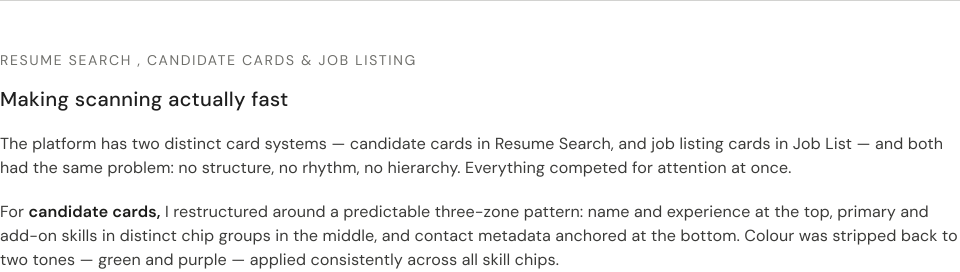
Before — Job Listing Cards
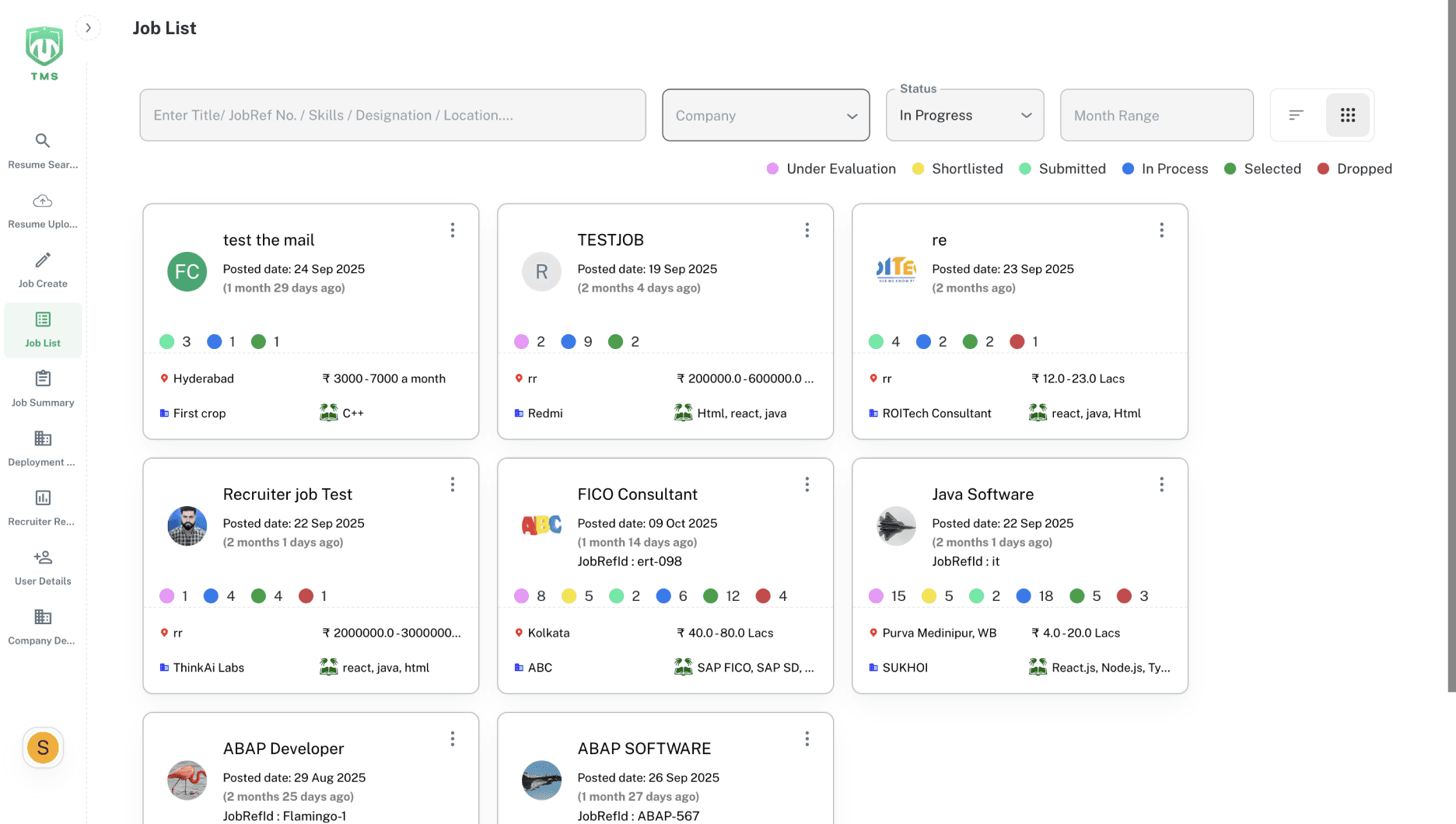
After — Job Listing Cards
Dashboard
RESUME BANK
Resume Search
Resume Upload
JOB POST
Job Create
Job List
REPORT
Job Summary
Deployement Report
Recruiter Report
USER
User Details
COMPANY
Company Details
S
Swastik Basak
swastikbasak.riotech
Enter Title / Job Ref No. / Skills / Designation / Location
Company
Status
Month Range
C Programming
May 2024- Present
2 months ago
Job Ref Id: 1405846
Shortlisted: 13
Selected: 9
Pan India
₹800-1K per hour
LTI Mindtree
C Programming
C Programming
May 2024- Present
2 months ago
Job Ref Id: 1405846
Shortlisted: 13
Selected: 9
Pan India
₹800-1K per hour
LTI Mindtree
C Programming
C Programming
May 2024- Present
2 months ago
Job Ref Id: 1405846
Shortlisted: 13
Selected: 9
Pan India
₹800-1K per hour
LTI Mindtree
C Programming
C Programming
May 2024- Present
2 months ago
Job Ref Id: 1405846
Shortlisted: 13
Selected: 9
Pan India
₹800-1K per hour
LTI Mindtree
C Programming
Pan India
₹800-1K per hour
LTI Mindtree
C Programming
Pan India
₹800-1K per hour
LTI Mindtree
C Programming
Job listing cards — performance metrics separated from metadata, colour noise removed.
Predictable card structure
Unified badge system
Filters separated from results
05 Outcome
A cleaner system. A foundation to build on.
The redesigned system was approved and moved into implementation. Due to technical constraints, some variations were made during development — which is normal for internal enterprise tools where legacy data structures shape what's possible.
What the redesign established was a clear UX and visual direction for the recruitment platform — one that reduced cognitive load in core workflows, created a consistent component foundation,
and gave the team a scalable system they could extend to other internal tools.
06 REFLECTION
Clarity is a form of respect.
Designing for people who use a tool eight hours a day is different from designing for a consumer app. There's no novelty factor, no delight to fall back on. Every design decision has to earn its place by making someone's actual workday easier.
This project taught me to design with restraint — to remove before I added, to question every element that didn't serve a clear purpose, and to treat information hierarchy as the most important design tool in a data-heavy system.
"In a high-frequency work tool, the best design is the one users stop noticing, because it just works."
Next Project
Anchor: A Dementia Care App