BACK TO HOME
ANCHOR · CASE STUDY
UX Research
Inclusive Design
Healthcare
Academic
Anchor: Designing for the Mind, Not Just the Memory.
Designing a routine support system for early stage dementia patients, while preserving autonomy while reducing caregiver cognitive load
ROLE
UI/UX Designer
DURATION
2 Months
TYPE
Academic | Inclusive Design
01 CONTEXT
Early-stage dementia is not a visibility problem. It's a
routine problem.
Most early-stage dementia symptoms appear as routine confusion rather than visible cognitive loss. According to the World Health Organisation, nearly 75% of people with dementia are diagnosed late — in part because early signs like repetitive questioning and task breakdown are dismissed as normal ageing.
The result is a gap period where the person still has significant independence, but their routine memory is no longer reliable. This is the window Anchor was designed for.
Individual (Before)
Person with Early Dementia
Manages own routines
Occasional Memory Lapses
Memory Breakdown
Caregiver Load (During)
Primary Caregiver
Repetition · Supervision
Verification · Exhaustion
Increased Dependence
Fragmented System (After)
Family Member
Maid
Nurse
Repeated handovers
No shared routine memory
Rechecking & mistrust
Memory loss becomes a coordination and cognitive load problem — not just for the person with dementia, but for everyone around them. Anchor addresses the coordination failure, not just the memory one.
02 THE PROBLEM
Existing solutions increase notification fatigue.
They don't preserve independence.
In early-stage dementia, routine memory becomes unreliable, gradually shifting the burden of remembering onto caregivers. Most reminder-based apps respond to this with more notifications, which research shows increases anxiety and reduces compliance over time.
The problem isn't that users need more reminders. The problem is that the entire responsibility for memory has shifted from the person to the caregiver, with no system in between to support that transition gracefully.
"Design a low-cognitive-load routine support system that enables simple task confirmation for individuals with early-stage dementia while introducing controlled escalation to caregivers only when necessary — preserving the user's independence without compromising support."
Problem Statement
03 RESEARCH
What the literature and real caregivers told us.
Research was conducted across literature review, qualitative interviews, observational study, and think-aloud testing. The combination was intentional — literature to understand cognitive patterns, interviews and observation to understand the emotional and practical reality of caregiving.
COGNITIVE PATTERN
Recognition > Recall
Individuals with early-stage dementia retain recognition ability significantly longer than independent recall. Design for recognition, not recall.
NOTIFICATION IMPACT
Alert Overload Increases Anxiety
Frequent reminders and notifications increase anxiety in dementia patients and reduce long-term compliance — the opposite of the intended effect.
SUPERVISION SHIFT
Routine Support → Constant Supervision
Without structured systems, routine support gradually becomes constant supervision — exhausting caregivers and eroding patient autonomy.
SYSTEM GAP
No Shared Routine Memory
Caregivers rely on their own memory to track patient routines — no shared, structured tracking system exists between multiple care providers.
Qualitative findings reinforced the literature: supervision gradually becomes constant, patients deny memory gaps to preserve dignity, alert fatigue reduces system effectiveness, and caregivers lack any shared tracking infrastructure.
04 UNDERSTANDING THE USERS
Two users. Two entirely different needs.
Anchor serves two users simultaneously — and their needs are in tension with each other. The patient needs simplicity, calm, and autonomy. The caregiver needs visibility, control, and reassurance. The design had to serve both without making one feel they were being watched by the other.
Patient

Shankar Rao, 72
Retired teacher. Diagnosed with early-stage Alzheimer's two years ago. Values independence and routine. Dislikes feeling monitored or treated like a patient.
Goals
—
Maintain independence in daily activities
—
Remember important tasks without embarrassment
Key Behaviour
—
When confused, avoids the system rather than
exploring it
—
Struggles with multi-step navigation
Caregiver

Meera Rao, 65
Shankar's wife and full-time caregiver. Manages his medications, appointments, and daily schedule. Emotionally invested but overwhelmed. Wants to support without making him feel dependent.
Goals
—
Monitor routines without constant manual checking
—
Be alerted only when something actually goes wrong
Key Behaviour
—
Prefers reassurance and structure over raw data
—
Comfortable with basic apps; needs clean dashboards
05 DESIGN
Two isolated role flows. One shared system.
The Information Architecture decision to completely separate the caregiver and patient flows was deliberate. A shared interface creates cognitive overlap and role confusion — both of which are harmful in a dementia care context. The two flows share an entry point and a backend, but never the same screen.
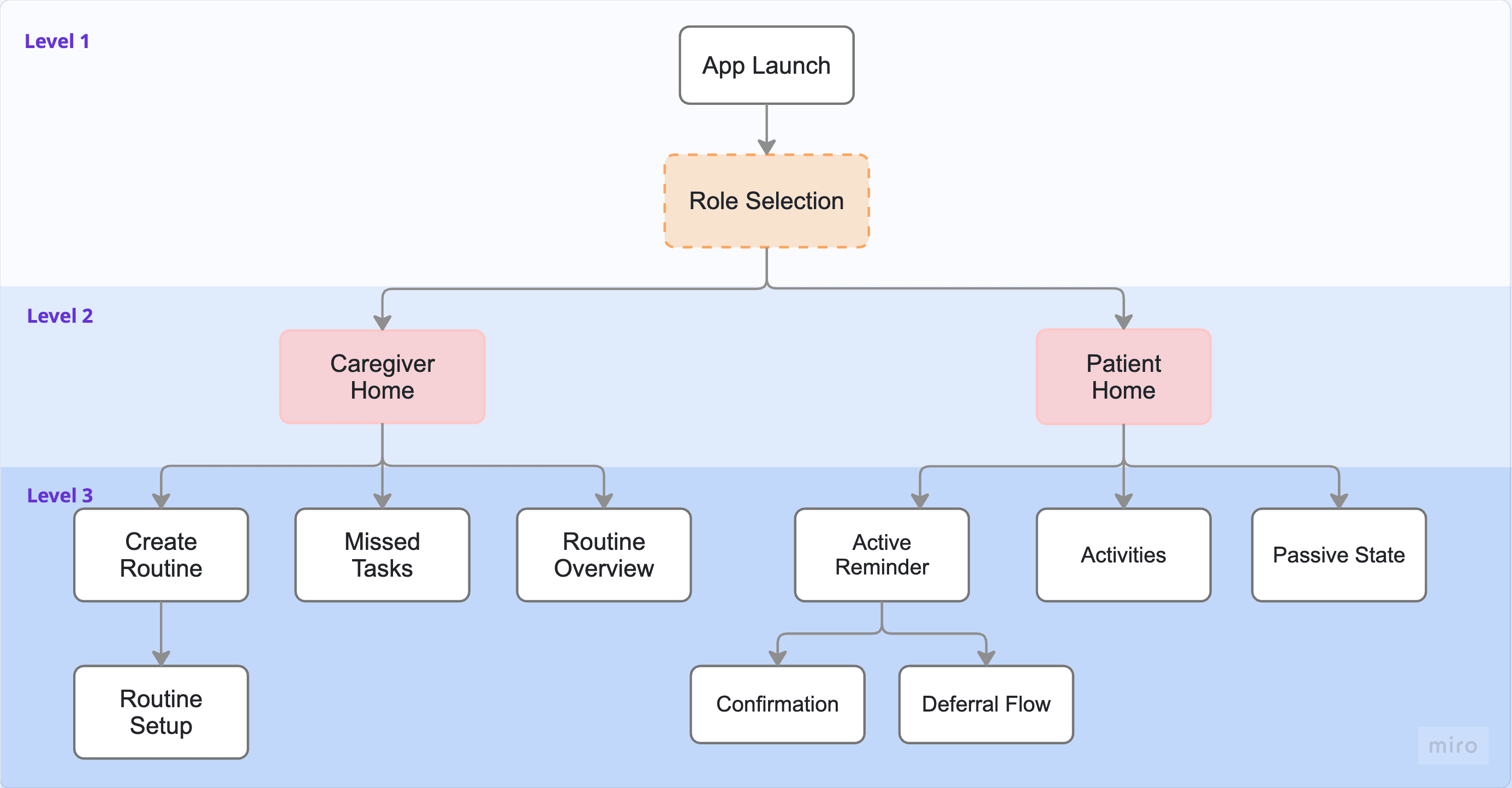
App Launch → Role Selection → Completely separated Caregiver Home and Patient Home. No mode-switching, no cognitive overlap.
The MVP was deliberately scoped: Routine Configuration → Time-Based Reminders → One-Tap Confirmation → Threshold Escalation → Caregiver Dashboard. No gamification, no performance scoring, no features that could create anxiety or performance pressure.
🧠
Cognitive Alignment
Design for recognition, not recall. Reduce decision load at every step. Show, don't ask.
🔔
Interaction Restraint
Escalate only when thresholds are crossed. Avoid continuous supervision patterns that erode autonomy.
📐
Structural Clarity
Clear visual hierarchy. Task validation is always the primary action. Secondary information doesn't compete.
🚫
No Gamification
Gamification in dementia care creates performance anxiety and comparison pressure. Explicitly rejected in this design.
😌
Emotional Neutrality
Eliminate performance framing. Use calm, non-anxious feedback. No scores, no streaks, no pressure.
🗣️
Framing Sensitivity
Avoid medicalised language. The system positions itself as support, not correction. Never as surveillance.
05 INTERACTION DECISIONS
Every interaction reduces, recall, panic or supervision burden.
The most consequential design decisions in Anchor weren't visual — they were interaction logic decisions. Each one was traced back directly to a research insight about cognitive load, anxiety, or caregiver behaviour.
DECISION 01
One-tap confirmation
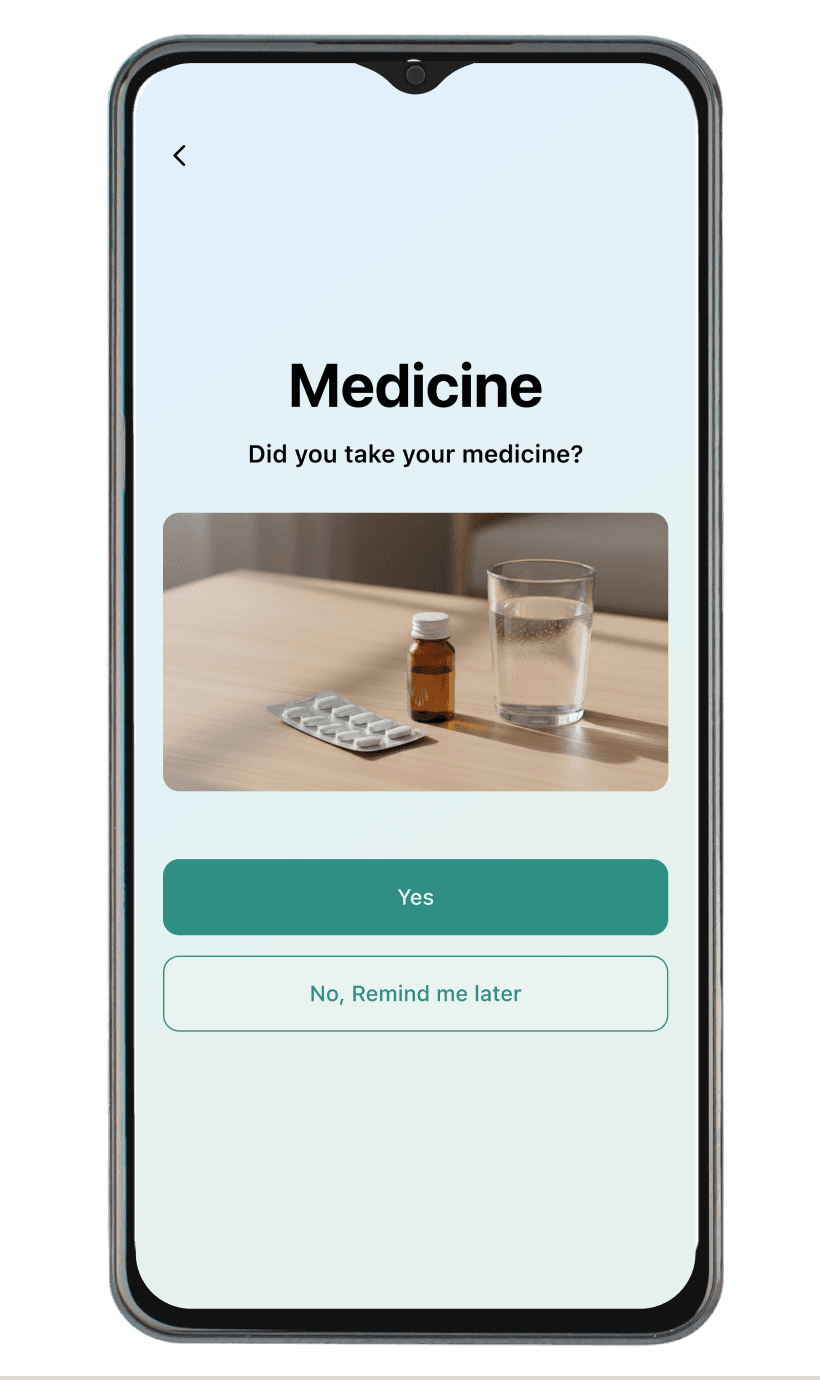
Confirmation requires a single recognisable action, not multi-step navigation. Reduces recall demand and eliminates interface confusion for the patient.
DECISION 02
Disabled CTA until valid selection
The confirmation button remains inactive until a clear selection is made — preventing accidental confirmation and ensuring intentional action without adding cognitive pressure.
DECISION 03
Threshold-based escalation
Caregivers are only alerted after a defined number of missed confirmations — not on the first miss. Avoids false alarms and preserves the patient's sense of autonomy.
DECISION 04
Passive reminder screen
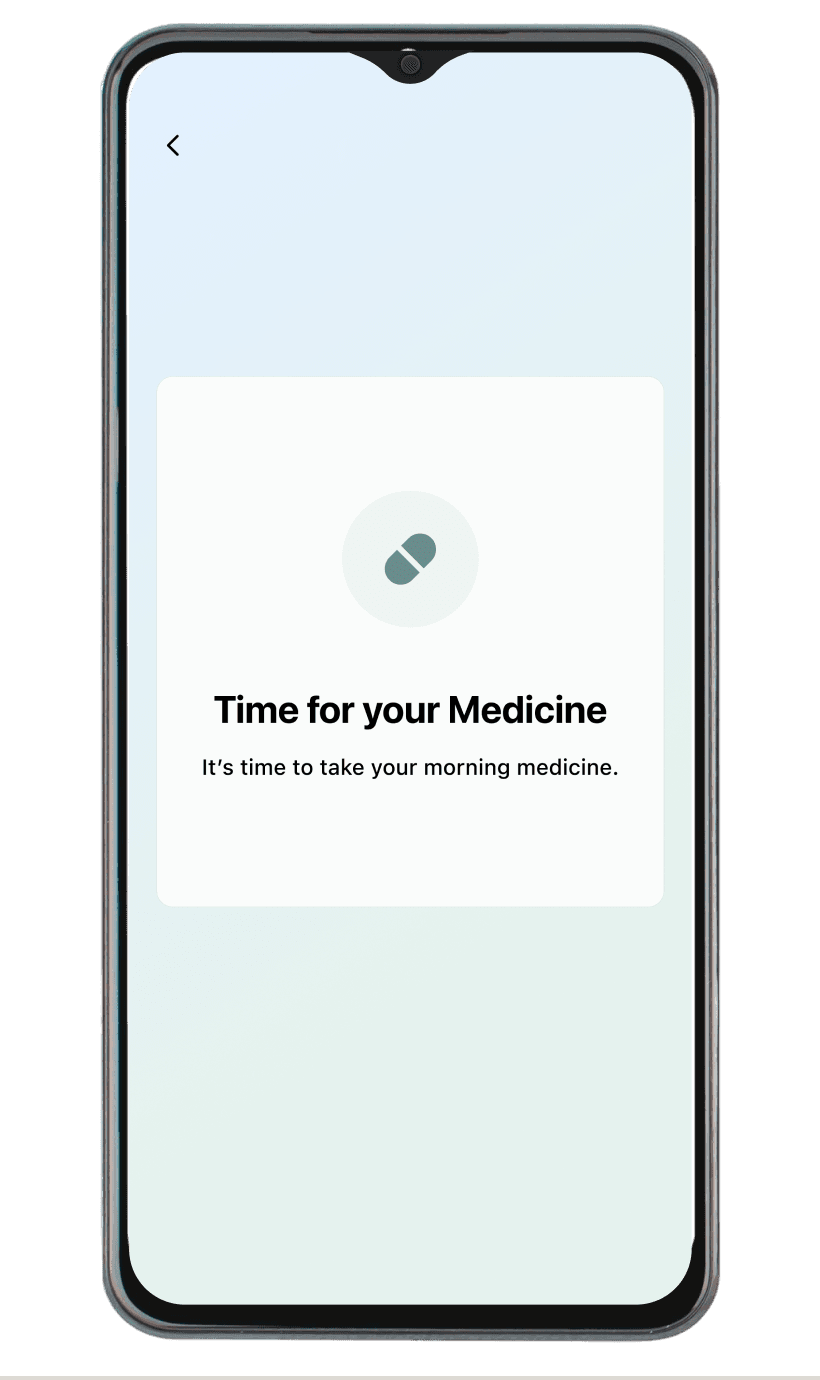
The initial reminder is intentionally passive — it informs without demanding immediate action, reducing anxiety and preserving autonomy for users with cognitive impairment.
The Buffer Screen — Most Considered Decision
Deferred Escalation Through Graceful Degradation
When a patient selects “Remind me later,” the system shows a buffer screen: “We’ll remind you again shortly. Take your time.” This intermediate state is intentionally designed to prevent immediate escalation to the caregiver and eliminate performance pressure. In cognitive design terms, this is called graceful degradation—the system doesn’t punish non-response. In dementia care specifically, it relates to autonomy preservation: the patient isn’t made to feel like they’ve failed or are being watched. The system silently schedules a follow-up reminder, and escalation only happens if the threshold is crossed—not on the first deferral.
05 KEY SCREENS
Role-based interfaces designed for different cognitive contexts.
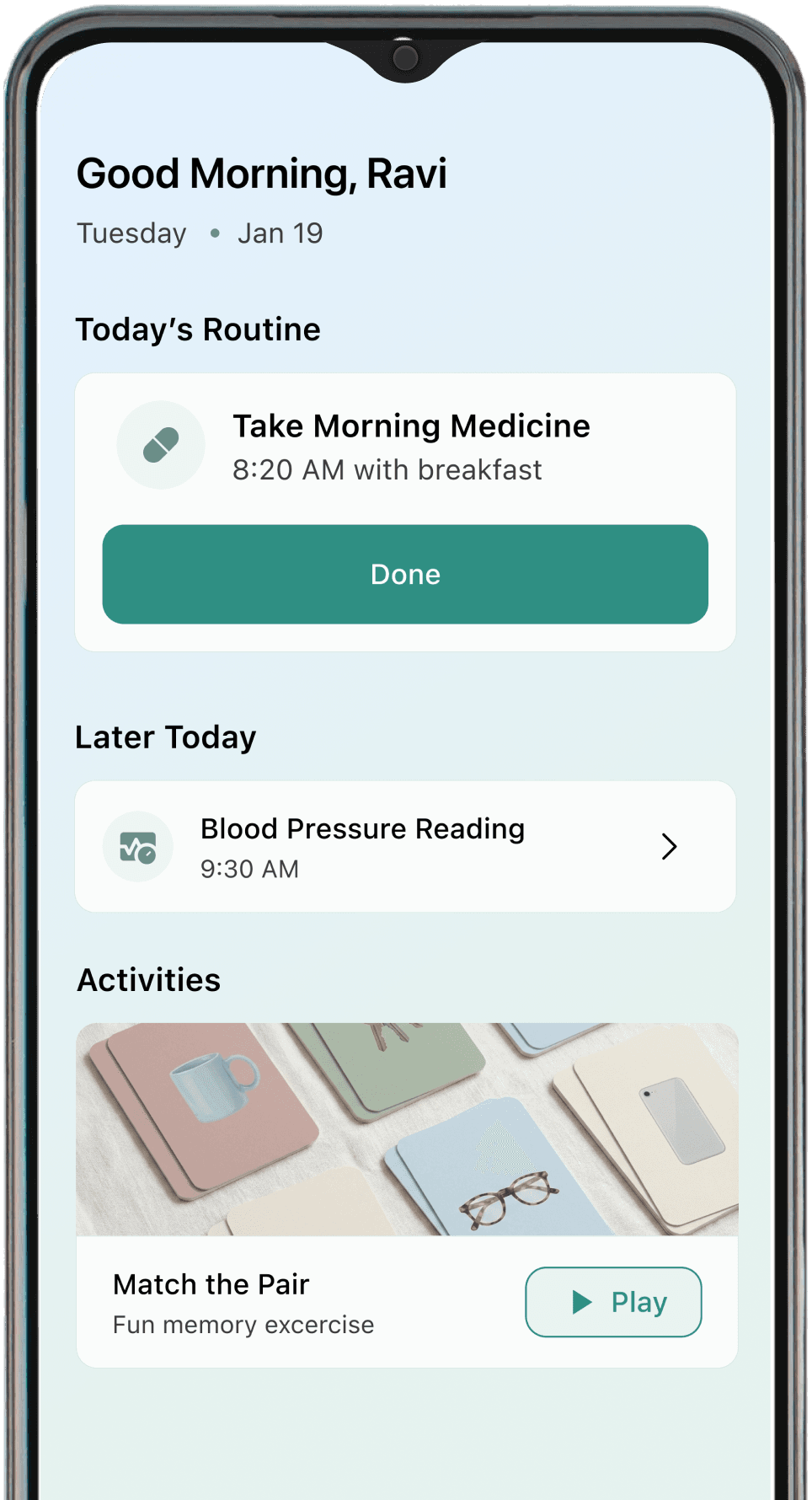
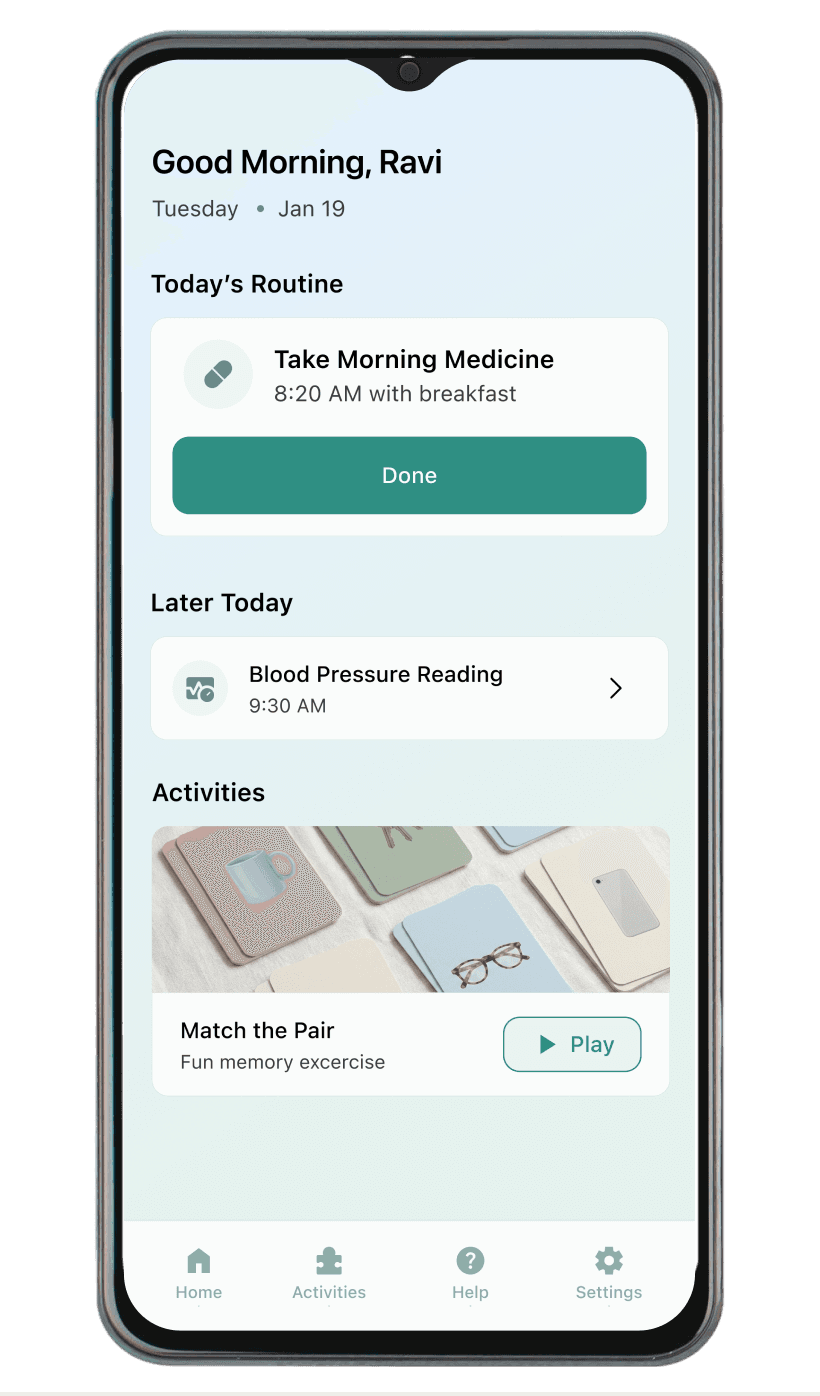
Patient Interface — simplified, large typography, single-task focus. The patient sees one task at a time and confirms with one tap. Nothing competes for attention.
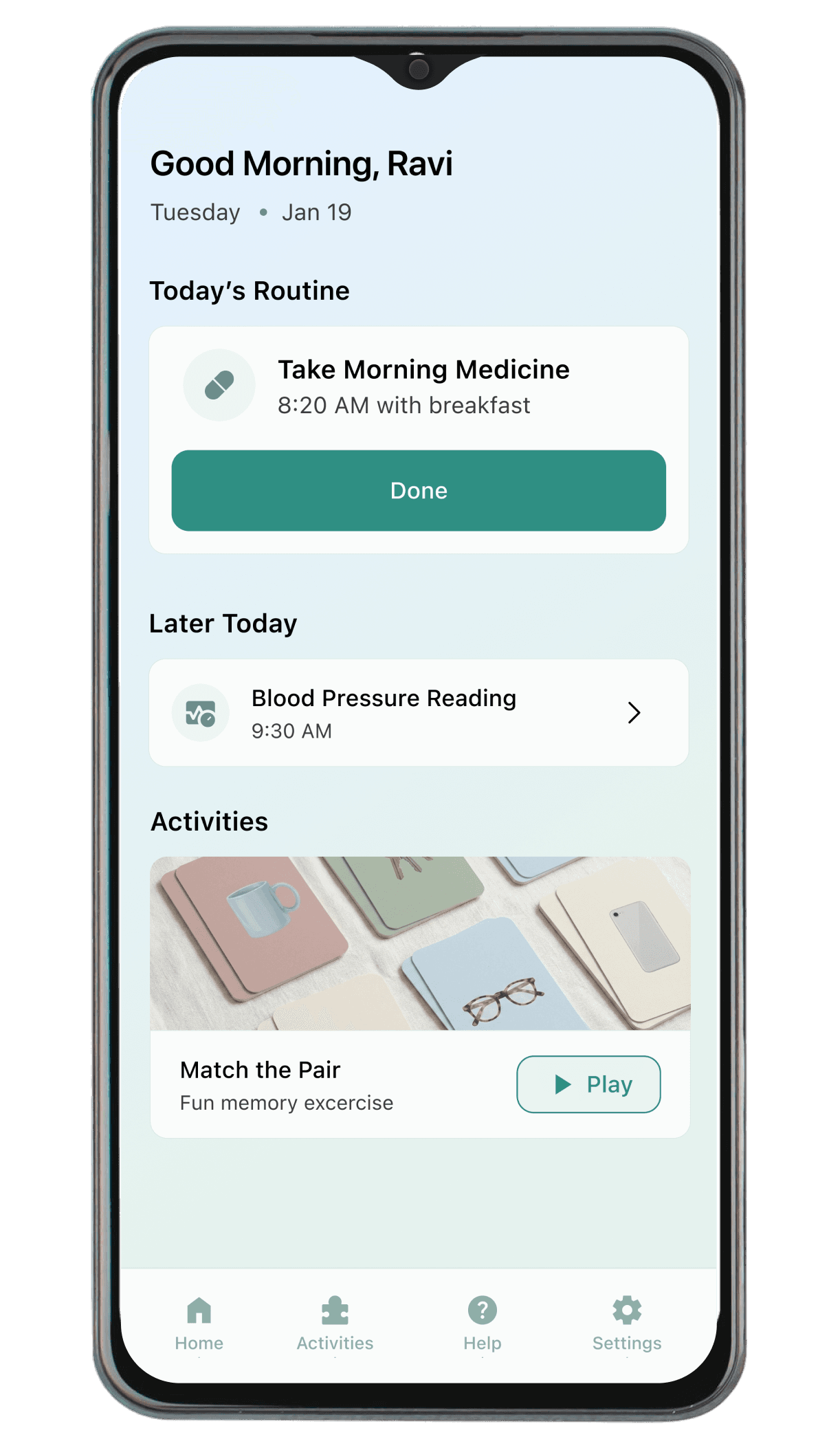
Patient Home
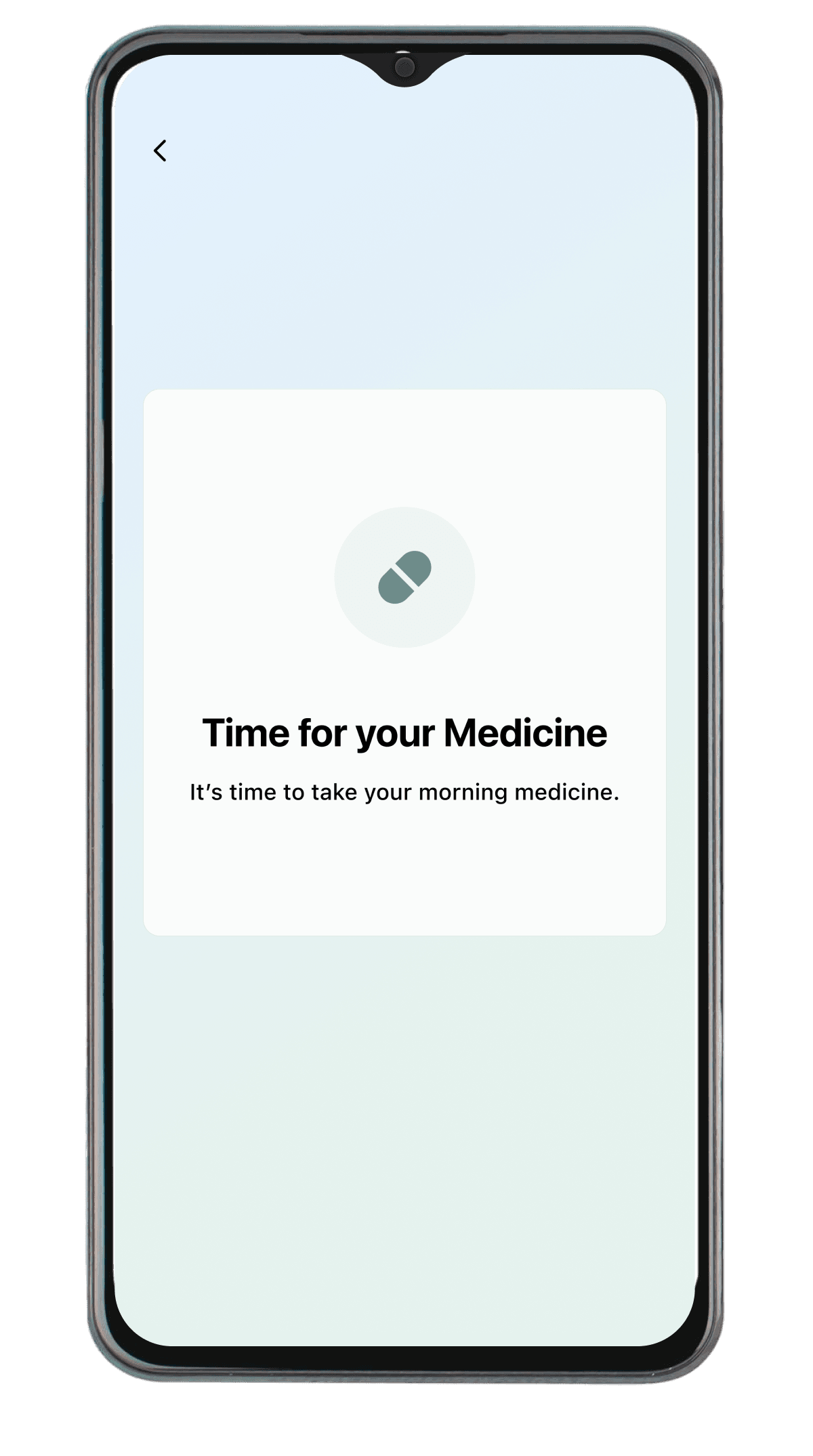
Reminder & Confirmation
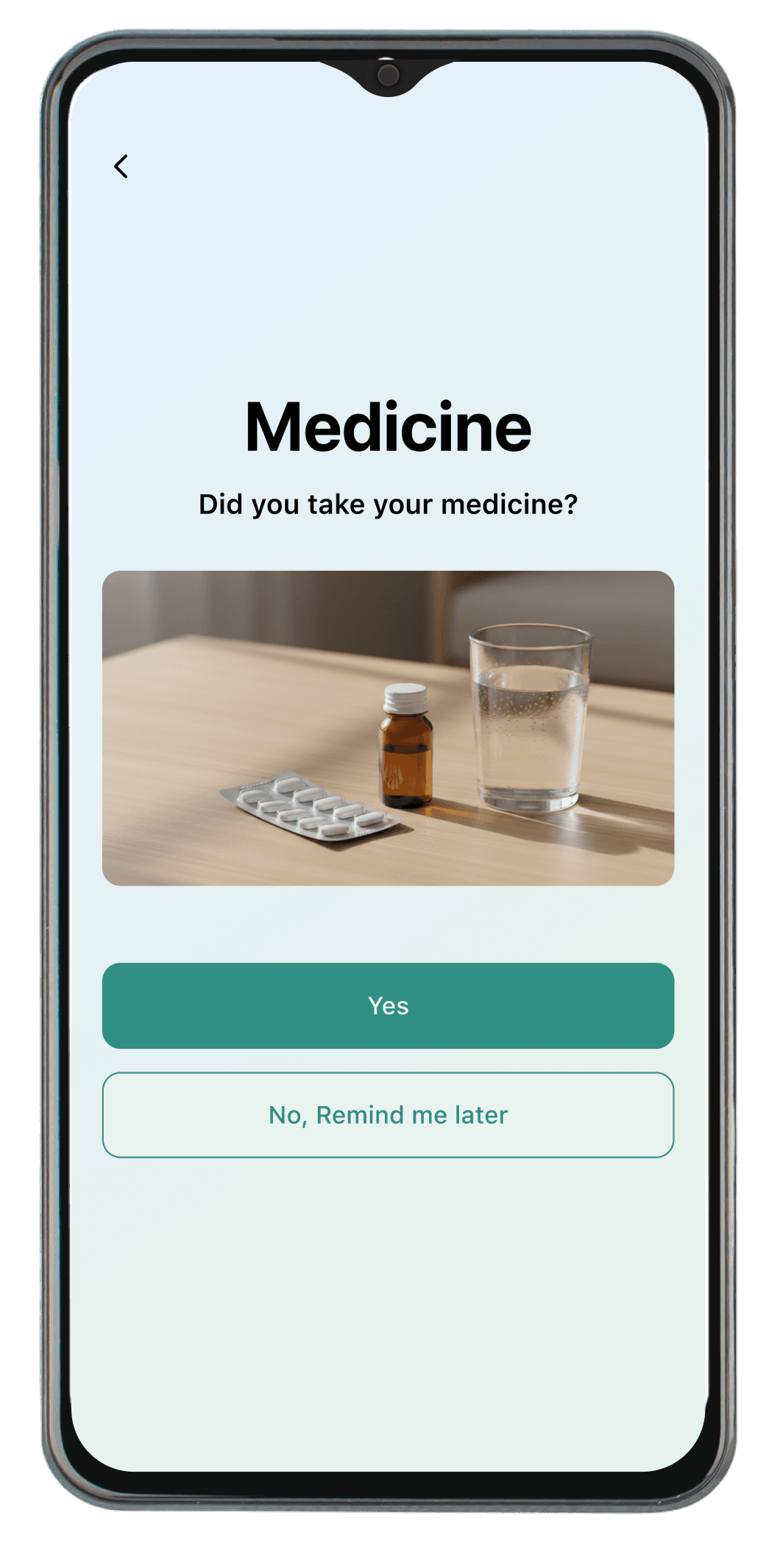
Reminder & Confirmation
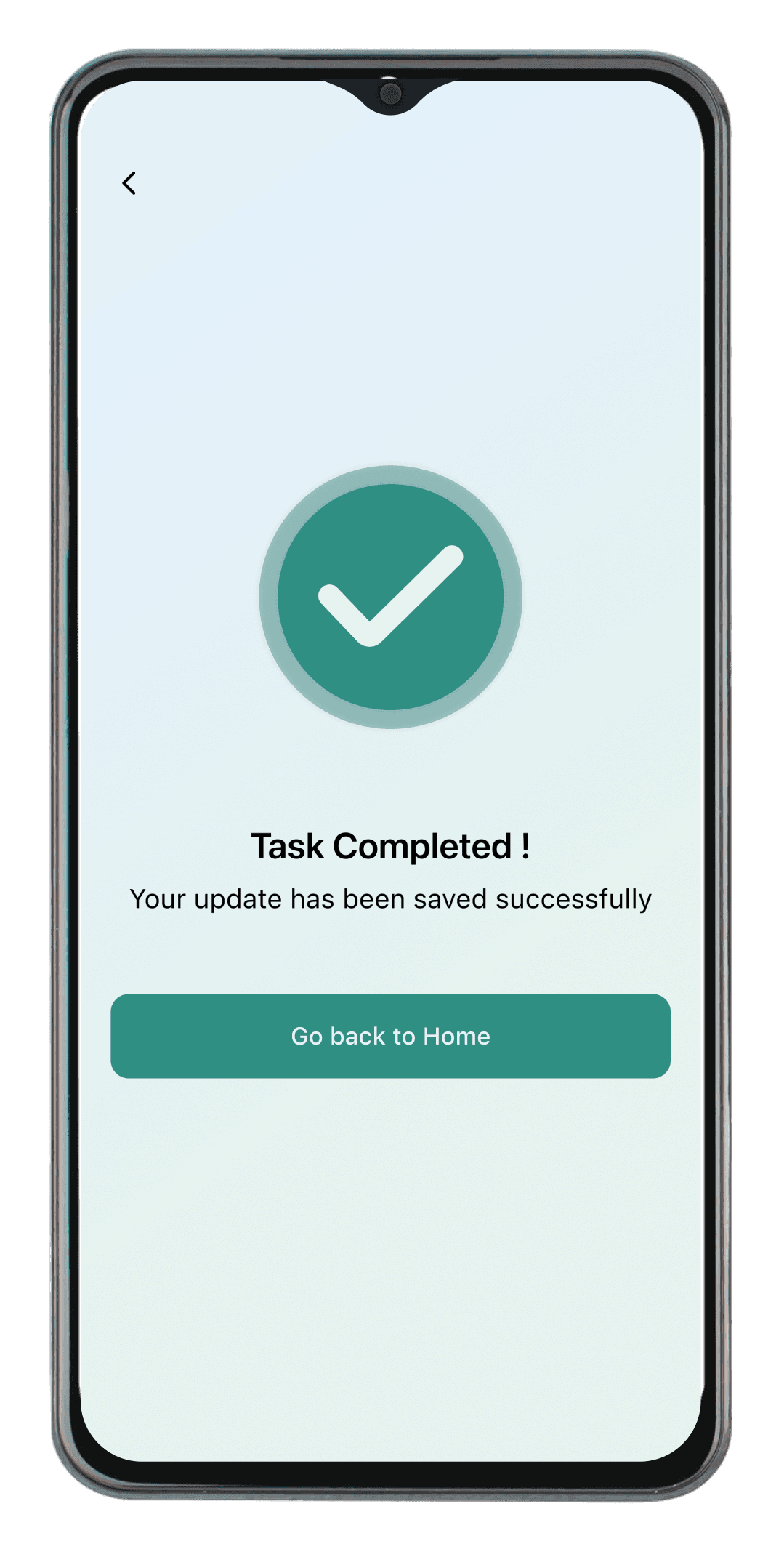
Reminder & Confirmation
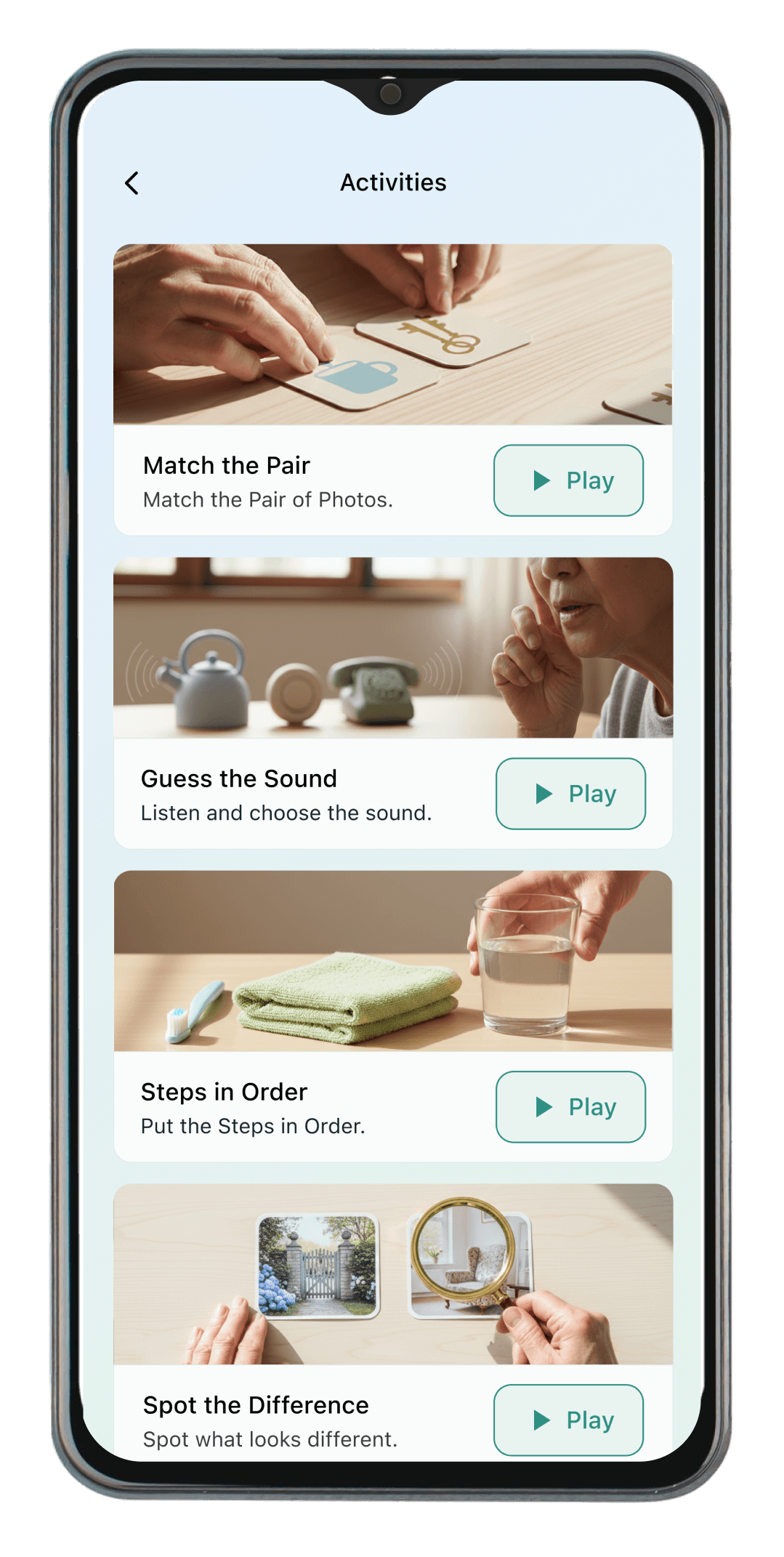
Activities Page
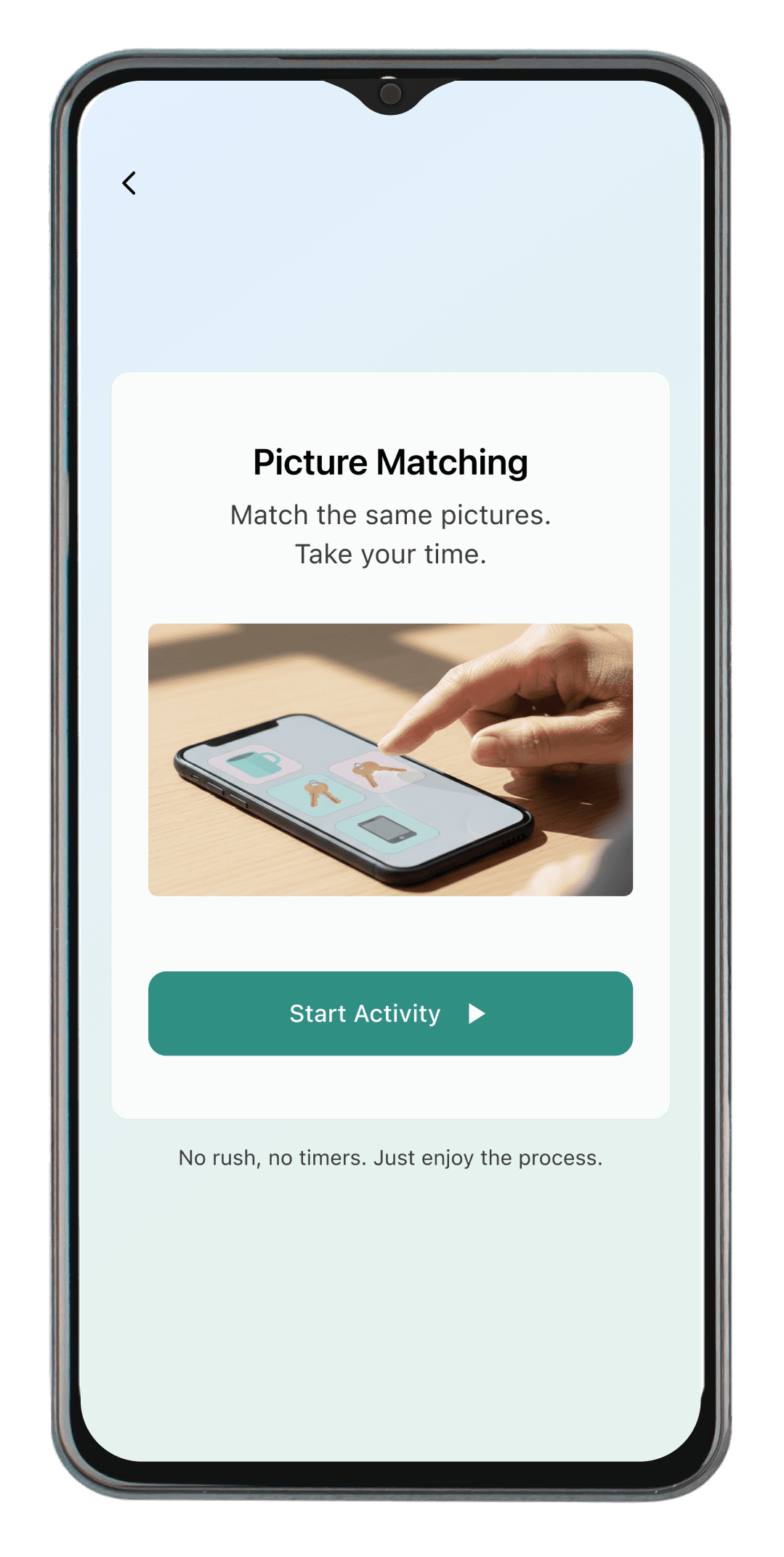
Activities Intro Screen
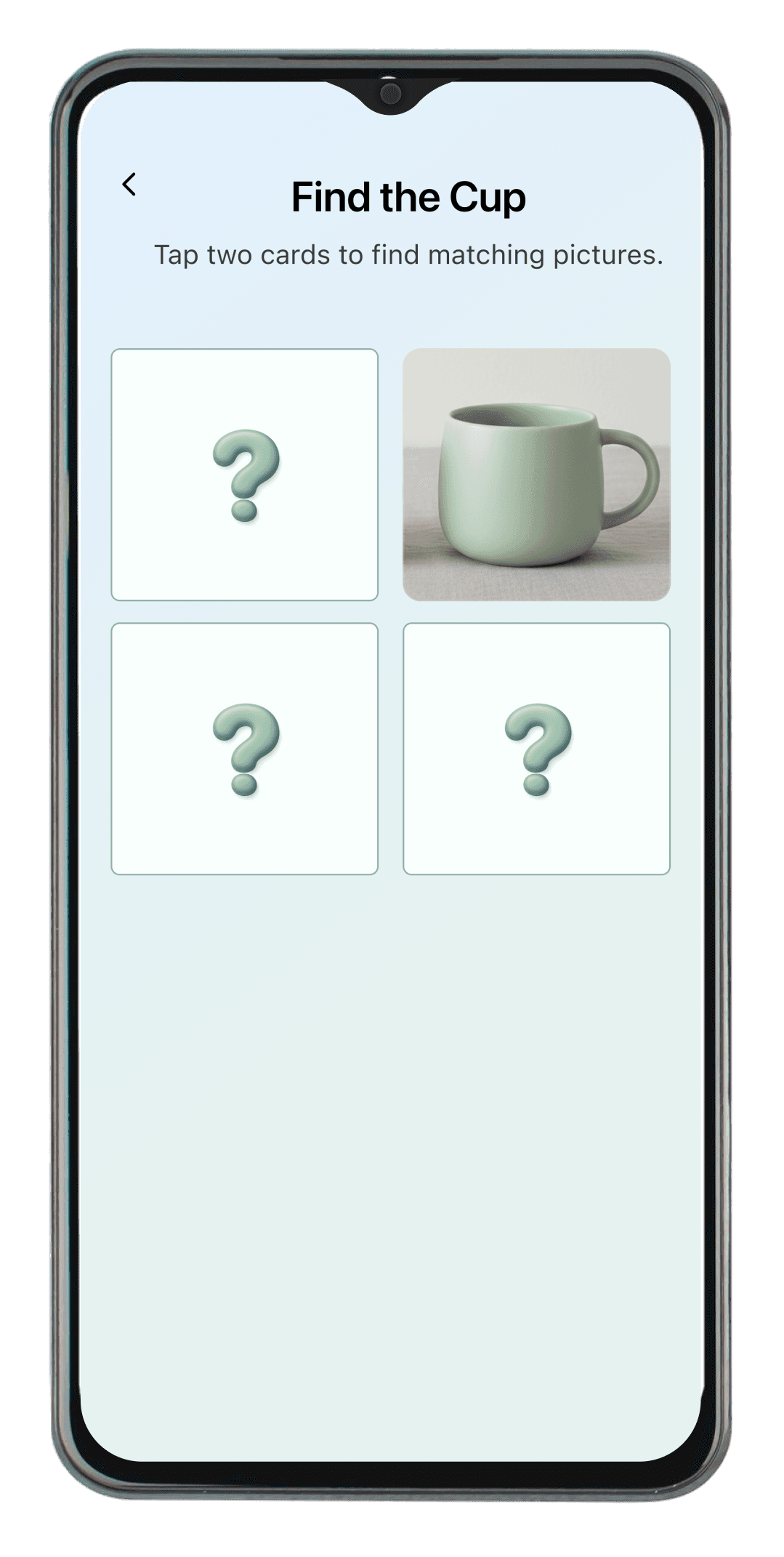
Gameplay Screen
Step 01
Patient Home Screen
—
Task list surfaces priority
order by scheduled time.
—
Routine item uses "Done"
CTA to signal actionability.
—
Secondary tasks remain
visible; no content hidden.
System
Entry State
▶
Auto-trigger
Step 02
Reminder Delivery Screen
—
System-triggered at
scheduled time; no user
navigation.
—
No CTA buttons displayed —
removes forced-action
pressure.
—
Soft fade-in transition
reduces abrupt context
switch.
—
No countdown or alarm
visual; preserves autonomy.
System
Passive
▶
Auto-advance
Step 03
Task Confirmation Screen
—
Exactly two choices — no
tertiary actions or branching
paths.
—
Primary (Done) vs secondary (No, Remind me later) hierarchy enforced visually.
—
Button press triggers pressed-state micro feedback.
Action
Branches Here
▶
Not Yet
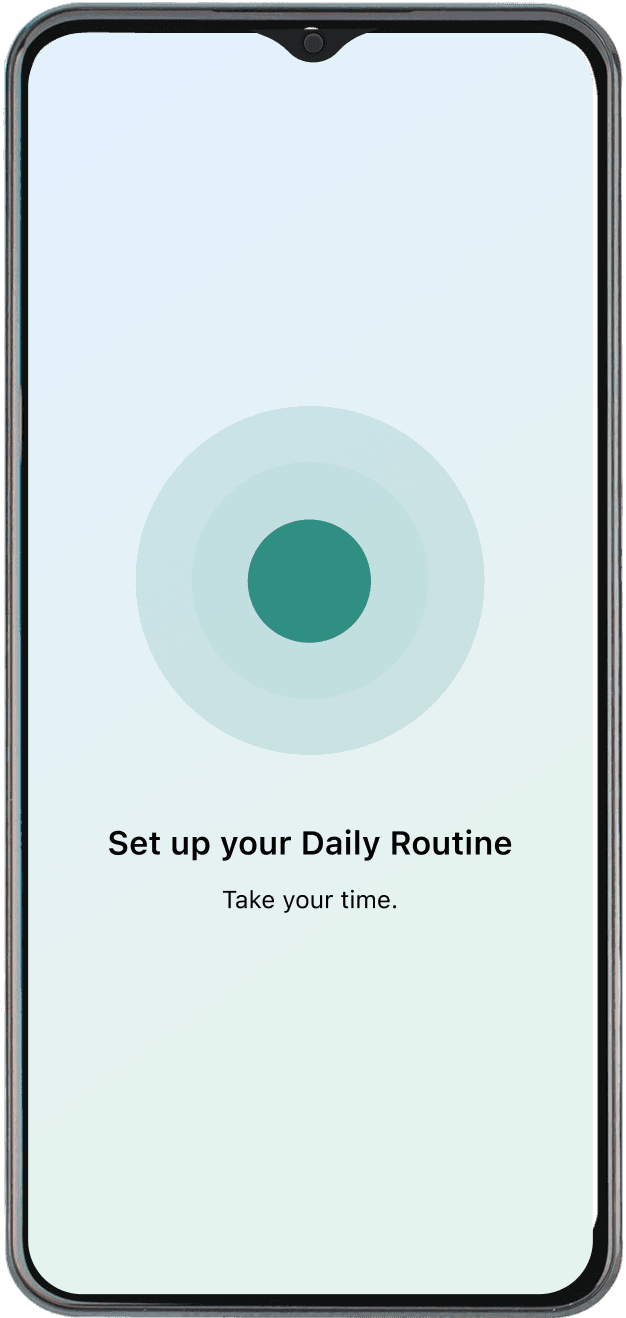
Step 04
Buffer Screen
—
Deliberate pause prevents
immediate caregiver
escalation.
—
Pulse animation (soft
expanding circle) signals
calm wait.
—
System silently schedules
follow-up; no user action
needed.
—
Auto-transitions to Home
after 1–2 seconds.
Feedback
Done Path
▶
Auto-return
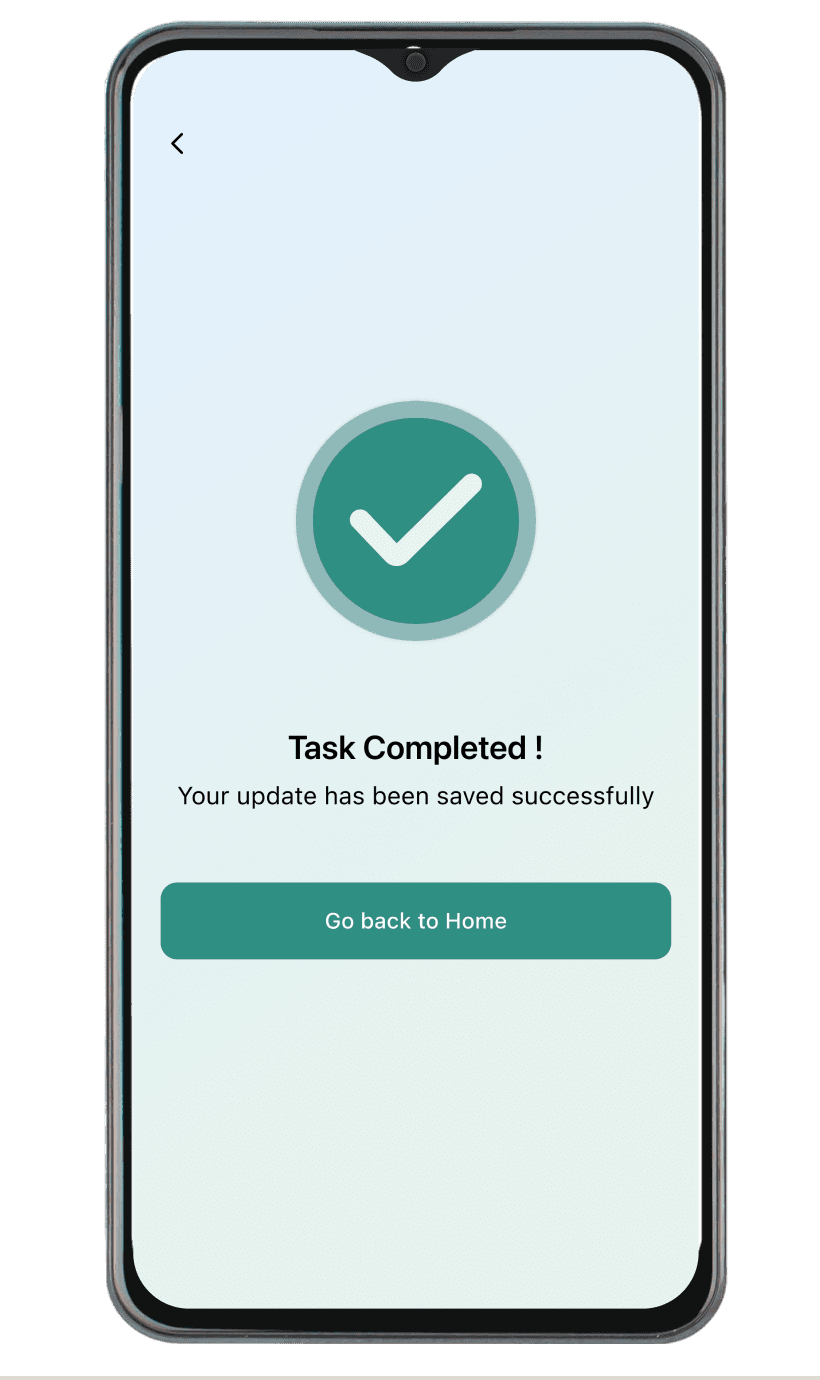
Step 03
Completion Confirmation
Screen
—
Success icon uses fade-in
to signal positive closure.
—
Single CTA ("Go back to
Home") removes decision
overhead.
—
Task marked completed;
state written to system
immediately.
Feedback
Done Path
▶
return
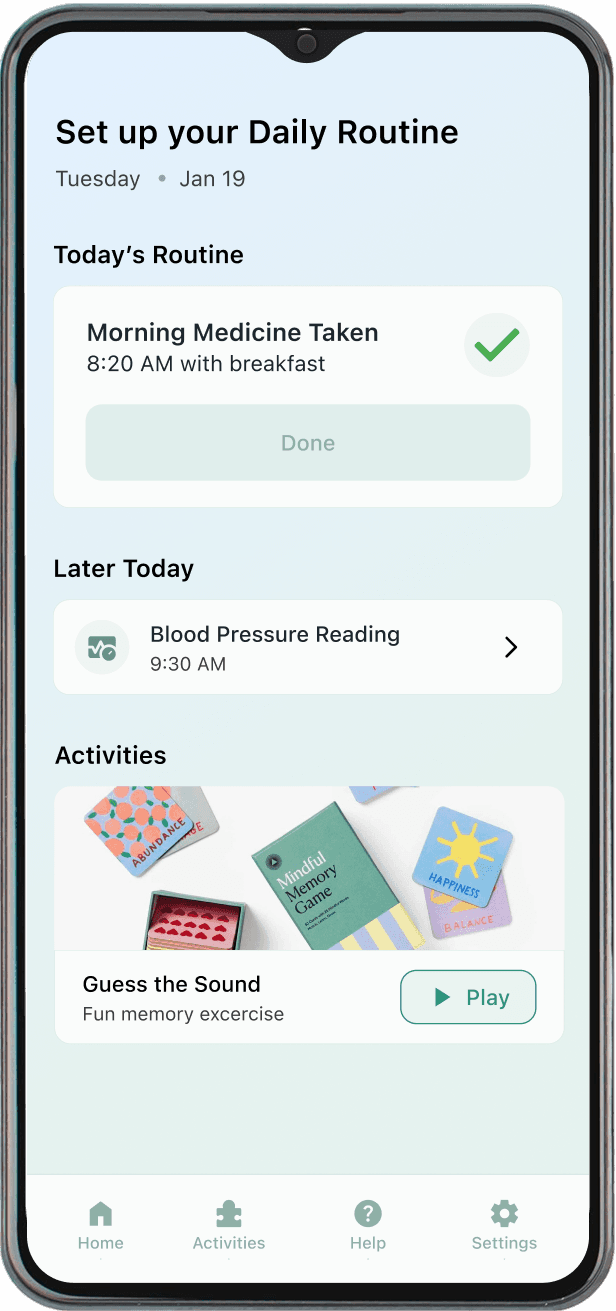
Step 04
Patient Home Screen
(Updated State)
—
Task item reflects "Done"
state; visual diff from Step 1.
—
Updated state confirms
system write without
explicit prompt.
—
Activities section rotates
content — maintains
engagement loop.
System
Updated State
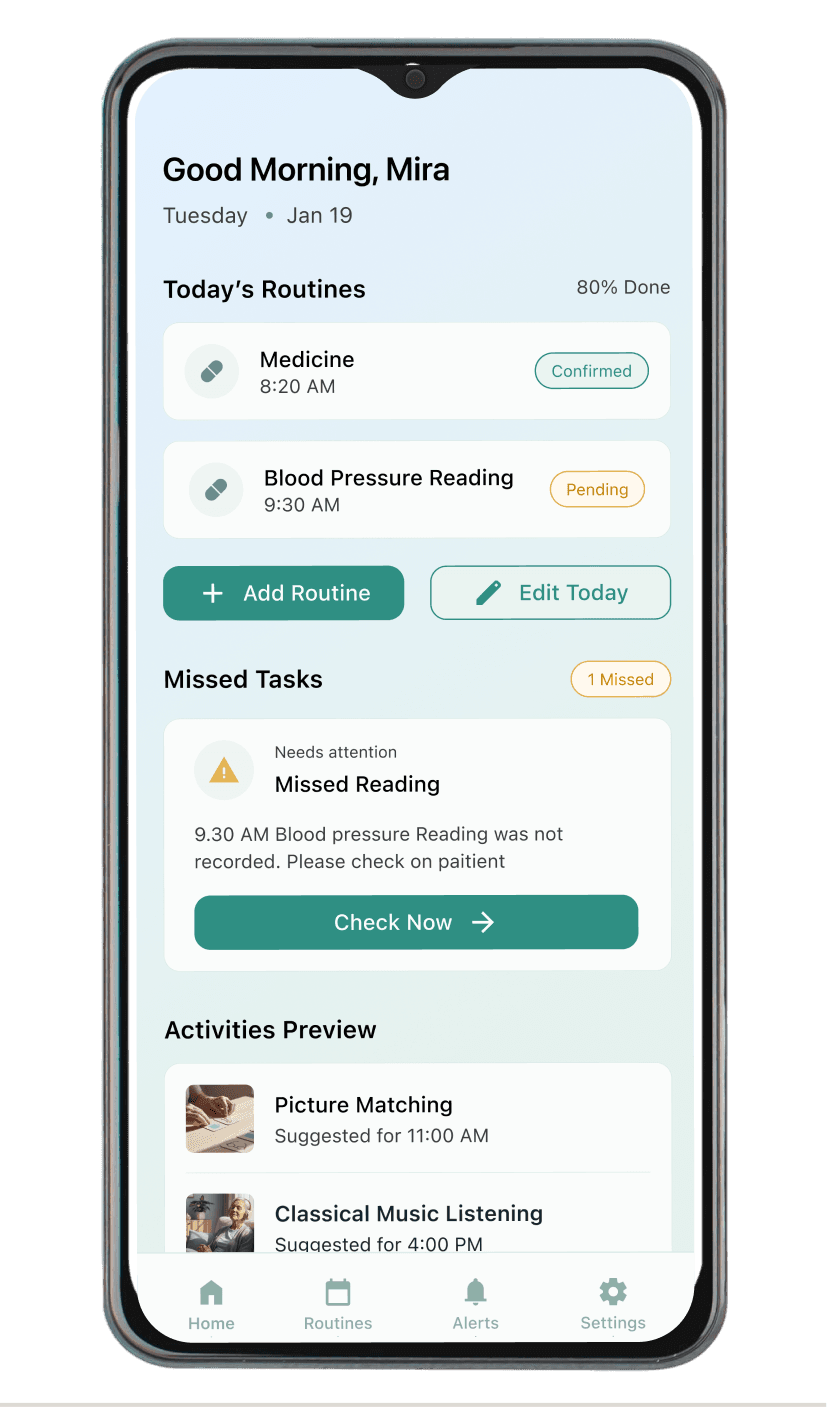
Step 01
Caregiver Home Screen
—
Missed Tasks section surfaces unresolved items with urgency indicator.
—
"Check Now" CTA scoped per missed task card; initiates caregiver action.
—
Routine task statuses visible in full; no content collapsed.
CAREGIVER
ENTRY STATE
▶
Tap "Check Now"
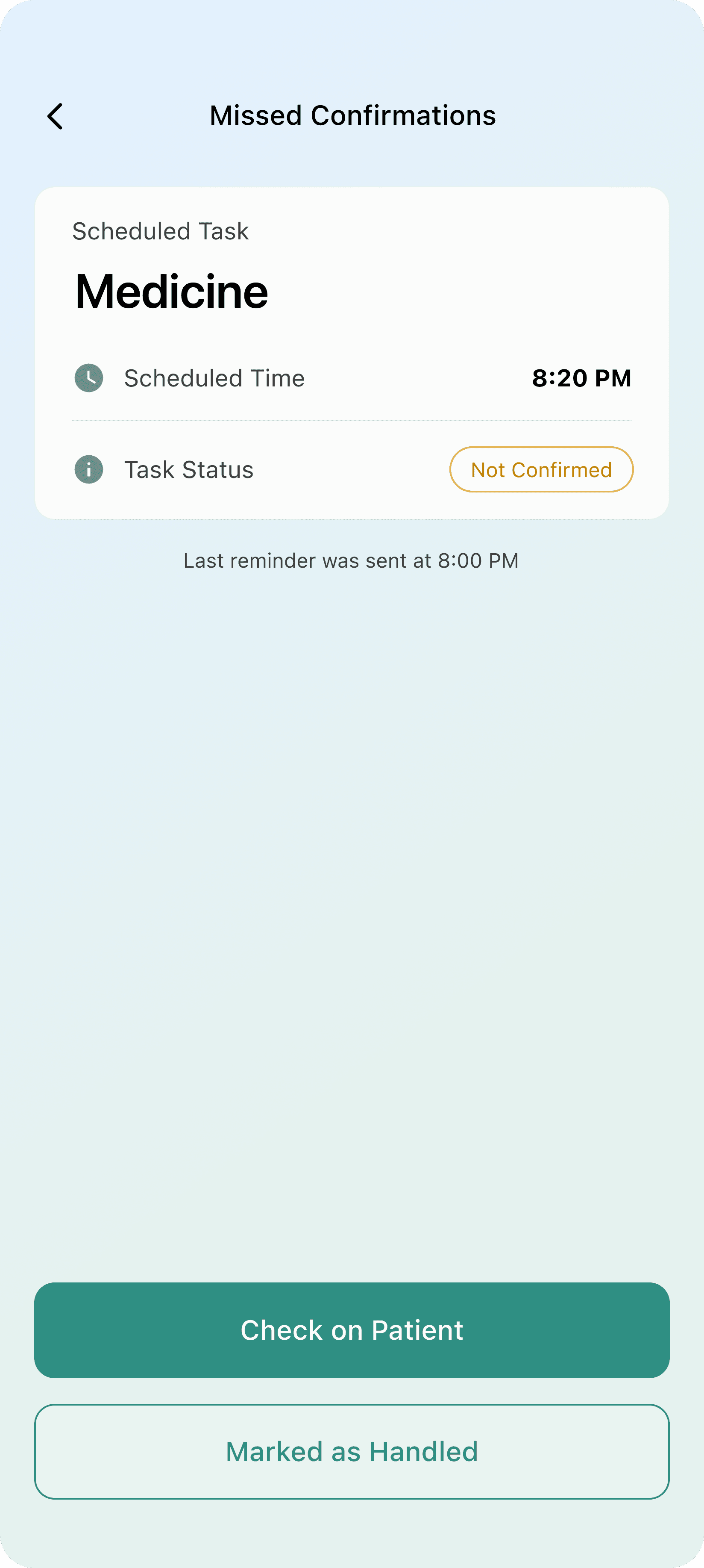
Step 02
Missed Confirmations: Task Details
—
Displays task type, scheduled time, and "Not Confirmed" status badge.
—
Status badge communicates deviation without alarm visual or sound.
—
Single primary CTA ("Check on Patient") reduces decision overhead.
System
DETAIL VIEw
▶
Tap "Check on Patient
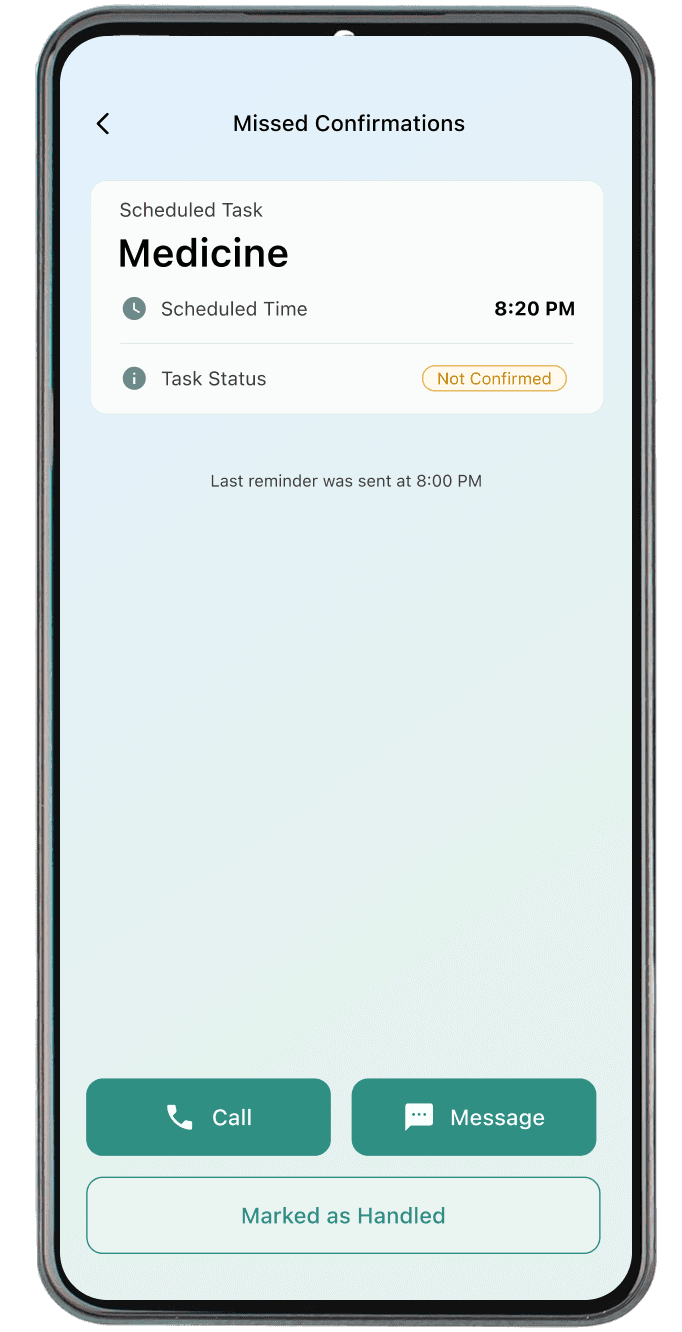
Step 02
Intervention Options Screen
—
Three discrete actions: Call, Message, Mark as Handled.
—
No pre-selected default — caregiver controls intervention level.
—
"Mark as Handled" resolves task without requiring patient contact.
ACTION
BRANCHES HERE
▶
Call / Message
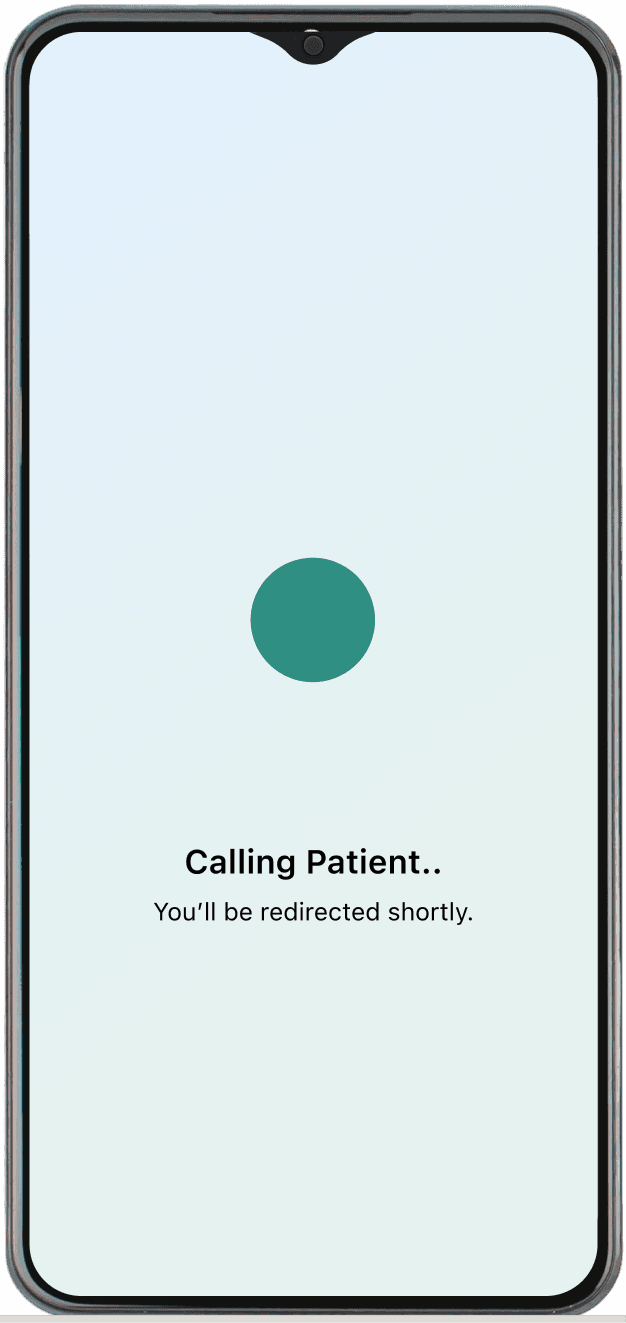
Step 03
Buffer Screen
—
Transition Screen (Call / Message)
—
Pulse animation (soft
expanding circle) signals
calm wait.
—
System silently schedules
follow-up; no user action
needed.
—
Auto-transitions to Home
after 1–2 seconds.
Feedback
Done Path
▶
Auto Return
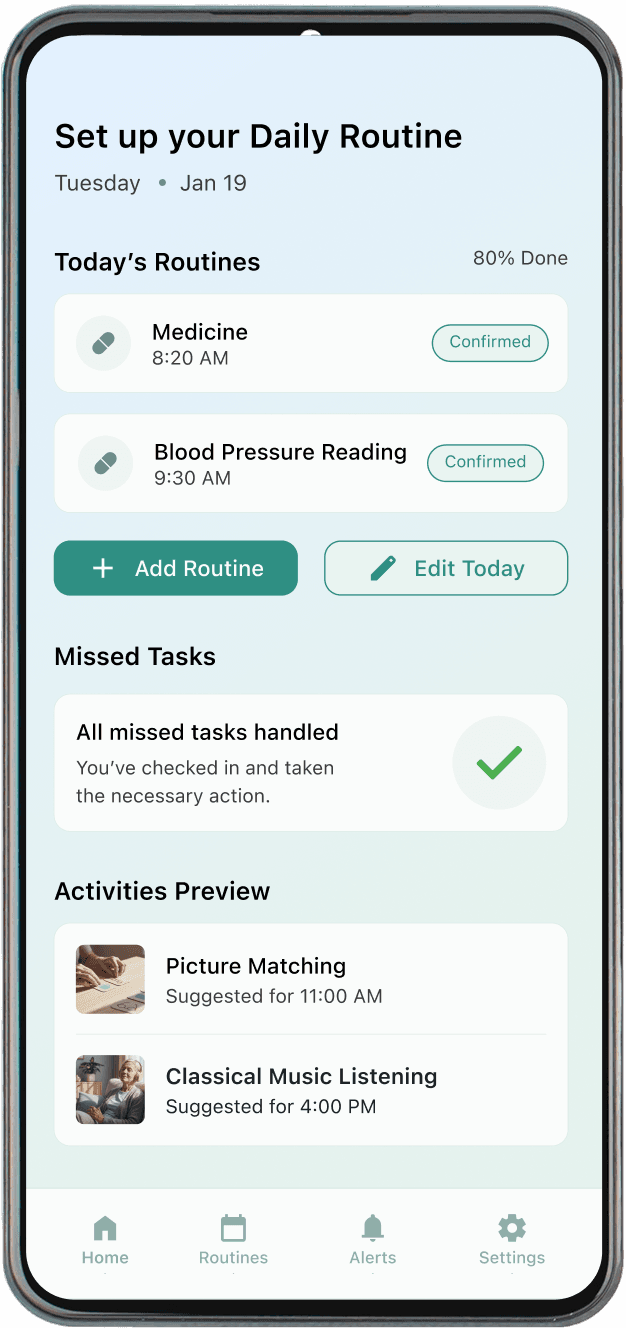
Step 04
Caregiver Home
—
Missed task card removed via fade-out; no abrupt visual shift.
—
Green check with soft scale-in replaces urgency indicator.
—
"All missed tasks handled" confirmation closes the intervention loop.
Feedback
Done Path
Patient flow: Home → Passive Reminder → Confirmation → Buffer Screen → Success. Each screen reduces one point of cognitive friction.
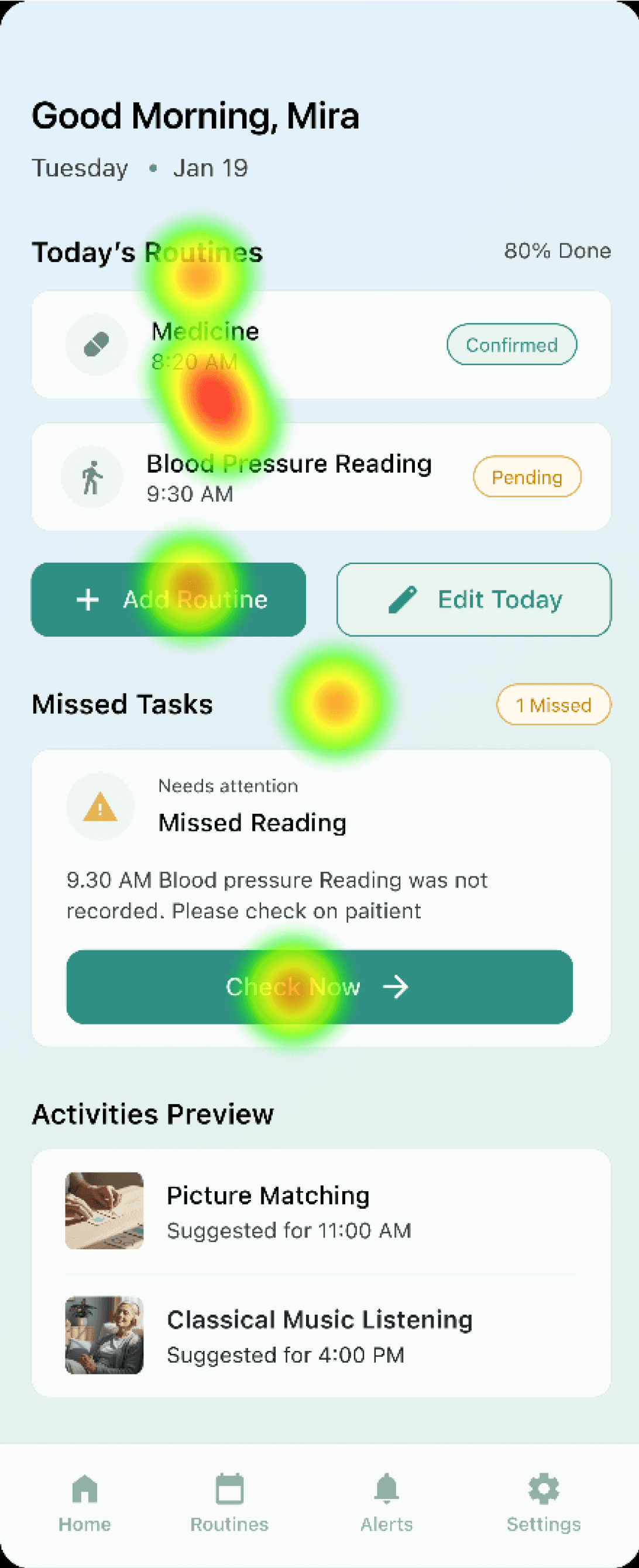
Testing was conducted with 5 participants across 5 core task flows using AOI-based eye-tracking review as part of the academic setup.
83.75
Mean SUS Score — Excellent Usability Range
Industry average: 68 · Excellent range: 80–90 · Best imaginable: 90+
Strong perceived ease of use across both caregiver and patient roles. Moderate standard deviation indicates consistent usability perception across participants.
App Launch → Role Selection → Completely separated Caregiver Home and Patient Home. No mode-switching, no cognitive overlap.
100% of participants successfully completed routine verification — validating the core interaction loop.
Alerts consistently attracted early visual fixation (3/5 participants) — confirming alert saliency, but indicating hierarchy calibration was needed.
Bottom navigation received minimal gaze attention — suggesting it could be deprioritised visually.
Selectable routine cards were occasionally perceived as static content — leading to stronger active selection states inthe next iteration.
Heatmap A
Heatmap B
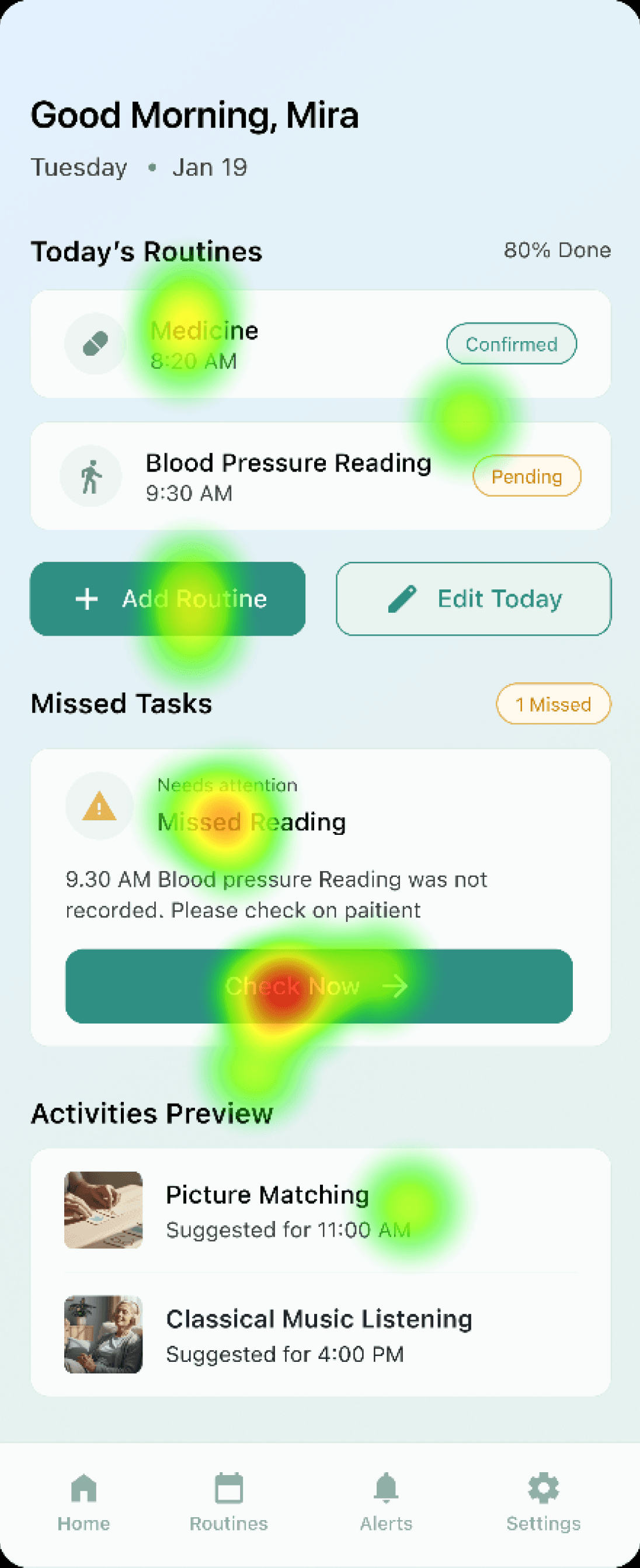
Heatmap A: alert and CTA captured early fixation, competing with surrounding elements. Heatmap B: task-focused vertical scanning, bottom nav largely ignored.
05 REFLECTION
What designing for dementia patients taught me about design.
Anchor was the most ethically demanding project I've worked on. Every design decision carried a different weight because the user I was designing for couldn't advocate for themselves, and the wrong interaction could cause real anxiety or distress.
The biggest lesson was learning when not to design. The instinct in UX is to add — more features, more feedback, more engagement. Anchor taught me that restraint is a design choice. Removing the gamification, limiting the notifications, adding a buffer before escalation — these were all decisions to design less, not more.
The buffer screen is the decision I'm proudest of. It's a small interaction — one screen, three words. But it embodies everything the project was about: preserving dignity, reducing anxiety, and trusting the user with time rather than demanding immediate action. That's what it means to design for cognitive and emotional realities, not just task flows.
"The system does not attempt cognitive enhancement. It supports structured living within decline."
Next Project
NutriScan: Food Label Nutrition Scanner