BACK TO HOME
NUTRISCAN · CASE STUDY
UX Research
Health Tech
Academic
NutriScan
Decoding food labels for smarter, safer choices — because
understanding what you eat shouldn't require a chemistry degree.
ROLE
UI/UX Designer
DURATION
2 Months
TYPE
Academic | Inclusive Design
01 CONTEXT
Why does buying food feel like a guessing game?
In India, food regulations require brands to list ingredients and nutrition facts. But regulations ensure safety — not understanding. The language on labels is technical, the font is small, and the marketing on the front of the pack is designed to mislead.
When understanding fails, purchase decisions default to brand trust, packaging aesthetics, and influencer recommendations, none of which are reliable indicators of what's actually inside the product.
65%
of Indian consumers admit to "rarely understanding" ingredient lists on packaged foods.
Yet 78% notice marketing terms like "organic" or "natural" and don't fully understand what they mean
Source: NielsenIQ, 2023 · Mintel, 2022
The Tropicana example illustrates this perfectly. Its packaging claims "Never from concentrate," "No artificial flavors," and "Non-GMO verified" — while Reddit users point out the product is high in sugar, acidic, and nutritionally far inferior to eating an actual orange. The claims are technically legal. But they're designed to create trust, not inform it.
For example
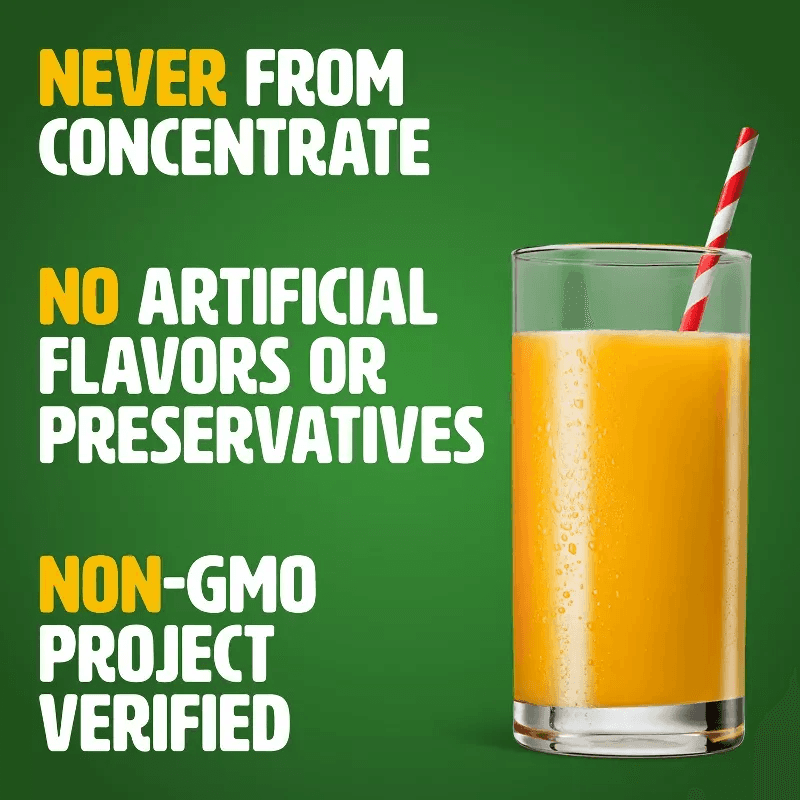
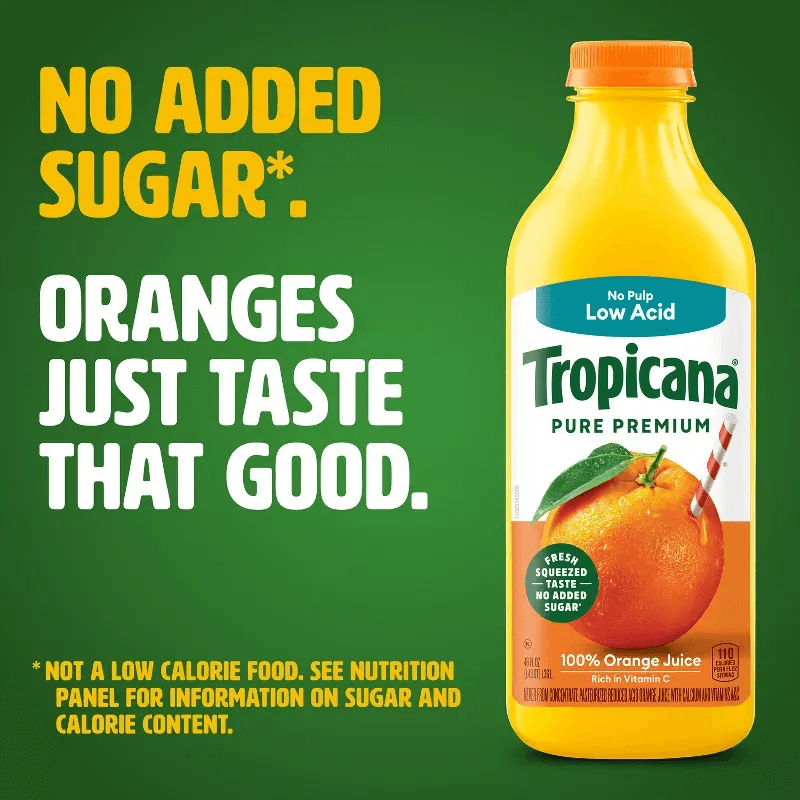
Tropicana claims and advertisments
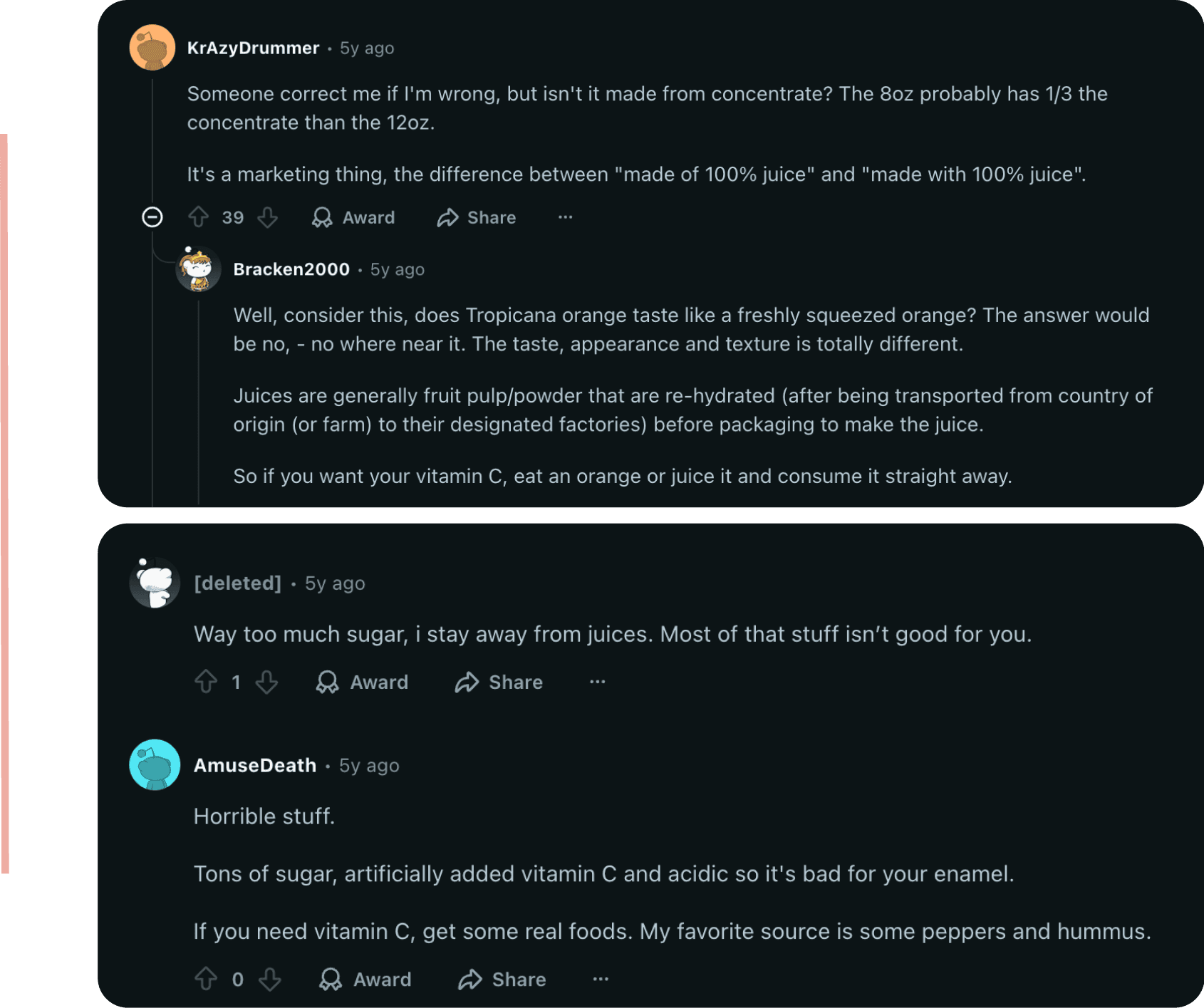
Tropicana Reviews (Reddit)
When marketing language fills the gap that understanding should — choices are made on false trust.
02 THE PROBLEM
The information exists.
The understanding doesn't.
Users struggle to make informed decisions about food products because nutrition and ingredient information — though present on labels — is often technical, inconsistent, and difficult to interpret.
This isn't just a literacy problem. It's a system problem. Multiple actors shape what users see and understand — regulatory bodies, brands, retailers, doctors, influencers — and the user sits at thecentre with the least power and the highest risk.
regulates
manufactures
sells via
delivers to
influences
advises
advocates for
FSSAI
REGULATORY BODY
Retailers
SUPERMARKETS / KIRANA
Quick Commerce
BLINKIT · ZEPTO · INSTAMART
Media & Influencers
HEALTH CONTENT CREATORS
Healthcare
DOCTORS · DIETITIANS
NGOs & Advocacy
CONSUMER GROUPS
Nutrition Label
ON-PACK
Marketing Claims
"ORGANIC" · "NATURAL"
Social Trends
VIRAL HEALTH CONTENT
Medical Advice
DIETARY GUIDANCE
Medical Advice
DIETARY GUIDANCE
Peer Influence
WORD OF MOUTH
THE
User
URBAN INDIAN SHOPPER
System actor
Touchpoint
Indirect influence
Direct flow
NUTRISCAN — ECOSYSTEM MAP
Price / Offers
PURCHASE TRIGGERS
Food Brands
MANUFACTURERS
The user has the least control but faces the highest risk in this system.
Gap 02
Information Overload
Dense back labels reduce comprehension and lead to
visual fatigue — information exists but not in a clear,
comparable format.
Gap 04
No Trusted Real-Time Tool
When uncertain, users Google ingredients or turn to
influencers — showing curiosity but no reliable, instant
solution.
Gap 03
No Personal Relevance
Products may be legally approved but unsuitable for
specific needs — allergies, age groups, dietary goals. No
personalised filter exists.
Gap 01
Label ≠ Understanding
No transparent, user-friendly system exists to decode
and validate on-pack claims at the point of purchase.
03 RESEARCH
Simple questions, solid answers.
Research was conducted across three methods to understand both the scale of the problem and the emotional
reality behind it.
METHOD
PARTICIPANTS
WHAT IT PROVIDED
Quantitative
Survey
42 respondents, ages 18–40 — young adults,
parents, health-conscious users
Data on label reading habits, confusion points,
and purchase influences
Qualitative
Interviews
6 individuals + 1 nutritionist — parents, working
professionals, fitness enthusiasts
Emotional triggers, barriers to comprehension,
trust vs. familiarity dynamics
Secondary
Research
FSSAI guidelines, NielsenIQ, Mintel, Journal of
Consumer Studies
Regulatory gaps, industry practices, and user
literacy context
Card sorting was conducted with 3 participants to understand how users naturally categorise app features — leading to the final navigation model of Search & Discovery, Decode & Learn, and Dashboard & Tracking.
Card Sorting
Type: Open Card Sorting
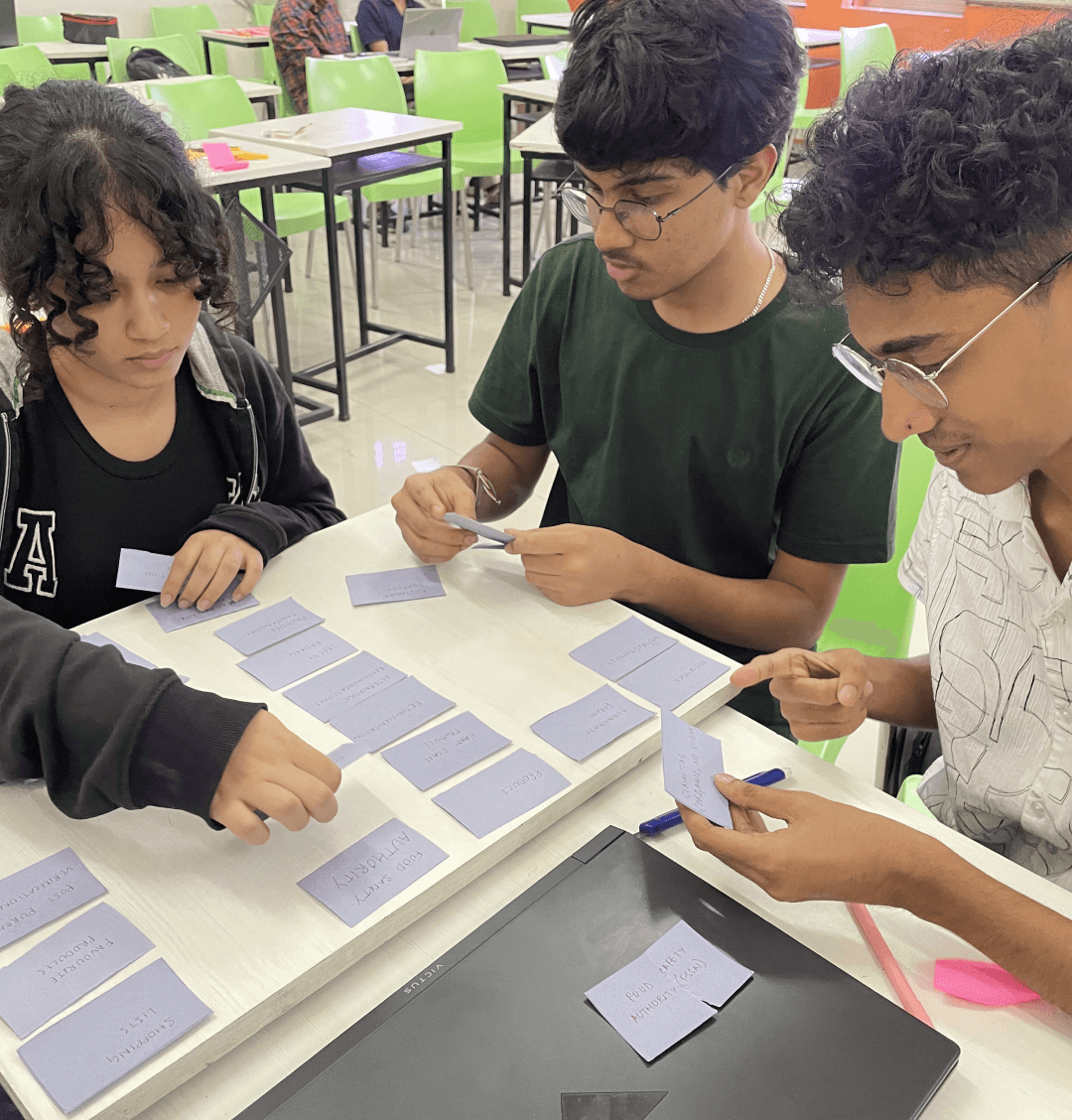
Goal:
To understand how users naturally categorize app features and label-related terms for intuitive navigation.
Preparation:
~30 cards created with potential features, content topics, and ingredient-related terms from the app.
Method:
Conducted with 3 participants (frequent grocery buyers and young parents) who grouped and named categories based on their understanding.
Outcome:
Clear grouping patterns emerged — leading to the refined navigation model for Search & Discovery, Decode & Learn, and Dashboard.
Open card sorting with 3 participants revealed clear grouping patterns that shaped the navigation structure.
04 KEY INSIGHTS
What users actually told us.
"I check ingredients sometimes, but half the words make no sense. Even when I Google them, I can't tell if they're good or bad."
Interview participant — Health-conscious professional
"If the packaging says 'organic' or 'safe for kids,' I just believe it. Bright colours and clean design make me think it's healthier."
Interview participant — Parent
"I have lactose intolerance, but I still end up buying products with milk solids. There's no quick way to know if something is suitable for me."
Survey respondent
65% of survey respondents admitted buying products influenced by social media trends rather than verified information. 78% noticed marketing terms like "organic" or "natural" but didn't fully understand what they meant.
Understanding the User
About
Priya Sharma, 34, is a working mother in Pune who struggles to understand food and baby product labels and distrusts marketing claims. She needs clear, reliable information and prefers simple interfaces with quick, easy guidance.

User Goals
Buy safe food products
Understand whether if the product is suitable for her child.
User Frustrations
Labels use tiny fonts and complex terms.
Claims like “organic” feel vague and misleading.
No clear warnings for baby-safe ingredients.
Tech Familiarity
High – Uses Amazon, FirstCry, Google daily.
Prefers minimal UI and direct information.
When confused, she defaults to branding instead of understanding ingredients.
Understanding the User
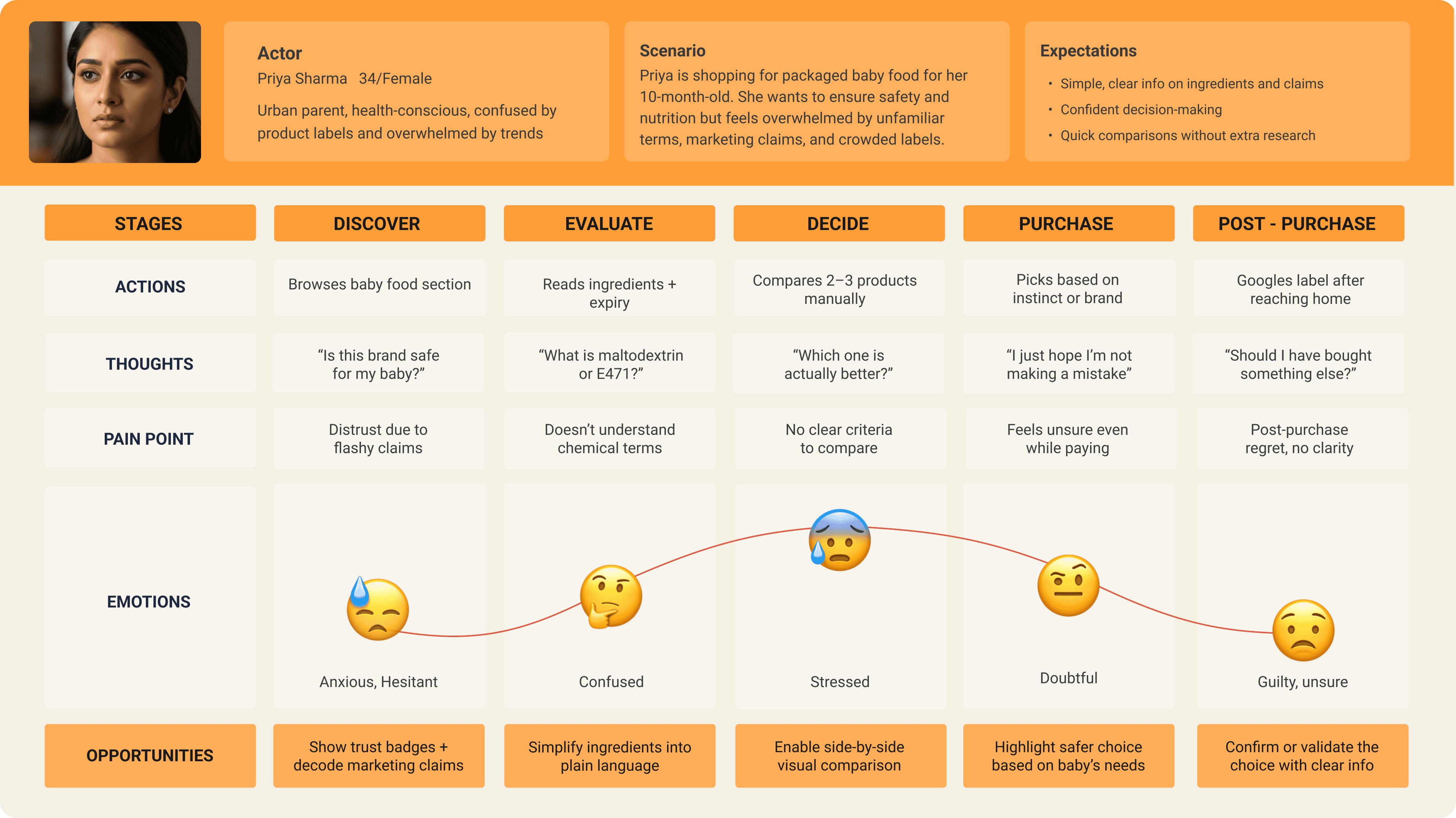
Priya's journey — from anxious discovery to guilty post-purchase doubt. Every stage had an unmet design opportunity.
"When understanding fails, choices rely on marketing — not facts."
05 Design
Design a label decoding app that simplifies ingredient
information and delivers personalised, trustworthy insights.
The core user flow was designed around two primary tasks: scanning a product to decode, check, compare, and save it — and tracking daily nutritional intake. Everything else in the app supports these two loops.
The navigation structure follows a hierarchical model — users move from broad categories to specific details — reducing cognitive load and improving scan efficiency. Three main levels: Onboarding → Global Navigation → Contextual Features.
🔍
Decode, don't overwhelm
Translate technical ingredient names into plain language. Surface what matters, hide what doesn't.
👤
Personalise the context
Safety isn't universal. Filter ingredient risks through the user's own dietary profile, allergies, and health goals.
⚖️
Enable comparison
Give users the tools to compare products side by side so decisions are made on facts, not packaging.
✅
Build trust through transparency
Reference FSSAI, FDA, and EU regulatory data to validate or challenge on-pack claims.
📊
Track without pressure
Nutritional tracking should feel supportive — goal-oriented progress, not a calorie counter that judges.
🧭
Recognition over recall
Tabs, safety badges, and visual ratings reduce the mental effort required to interpret information.
4 Hierarchy Levels · 7 Navigation Sections · 5 Onboarding Steps · 9 Global Actions
L0
Onboarding — Linear Entry Flow
L2
Global Navigation — Primary Systems
L3
Feature Systems — Grouped Functionality
L4
Global Actions — System-Wide Interactions
L0
Onboarding
— Linear Entry Flow — One-time user journey
1
Landing
→
2
Sign Up / Login
→
3
Account Setup
→
4
Permissions
→
5
Tutorial
Personalization Inputs
Dietary Preferences
Notification Preferences
Allergies
Health Goals
Medical Conditions
Age Group
Children Info
- Enters -
L2
Global Navigation
— Primary system structure — persistent across app
Home
Search & Discovery
Decode & Learn
Dashboard & Tracking
Experts
Profile / Settings
Notifications
L3
Feature Systems
— Grouped functionality per navigation section
Scan Product
Search by Name / Brand
Browse Products
Filters & Sorting
Search Results
Ingredient Breakdown
Nutritional Claims
Marketing Claims
Risk & Safety Ratings
Regulation Info
Articles / FAQs
Track Intake
Daily Logs
Progress Reports
Expert List
Expert Profiles
Book Appointment
Safety Alerts
Product Updates
Reminders
- Triggers -
L4
Global Actions
— System-wide interactions available throughout the app
Scan
Upload
Filter
Sort
Save
Compare
Book
Submit
Pay
Three-level IA: Onboarding → Global Navigation → Contextual Features. Hierarchical structure to reduce scanningfriction.
06 Key Screens
The core loop: Scan → Decode → Decide → Act.
The primary task flow captures the complete user journey — from scanning a product label to understanding its ingredients, checking its safety against a personal profile, comparing alternatives, and finding it on a delivery platform.
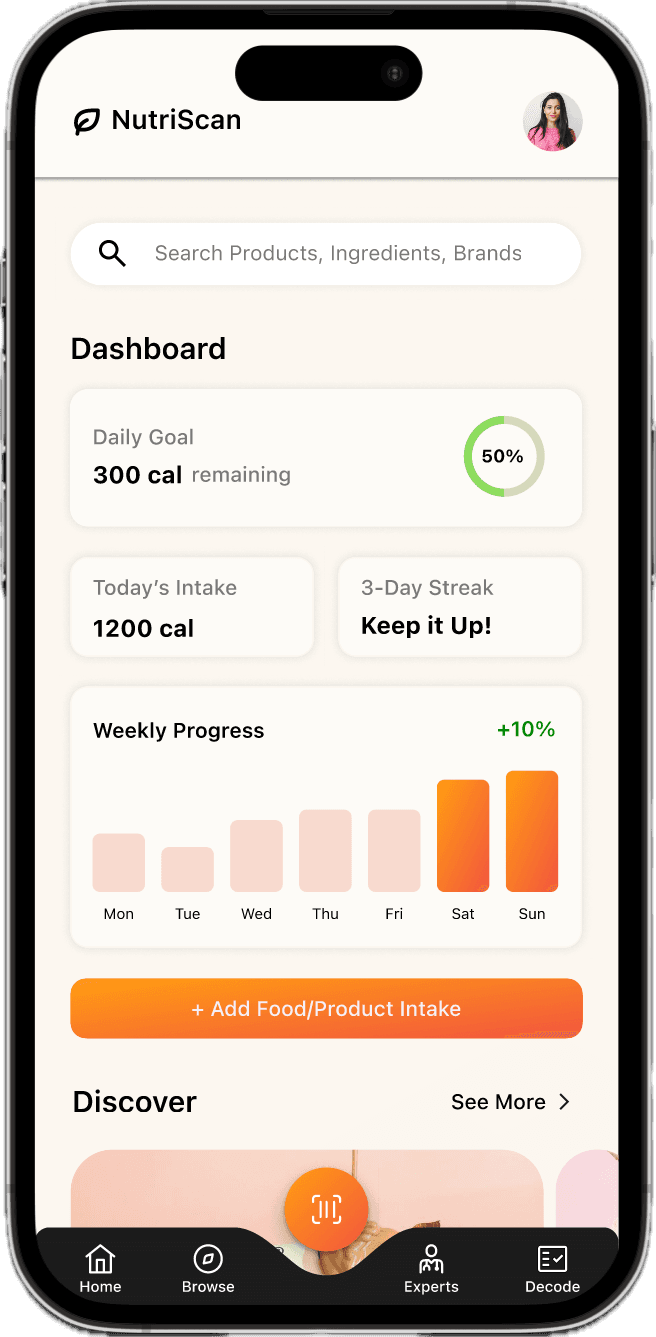
Home
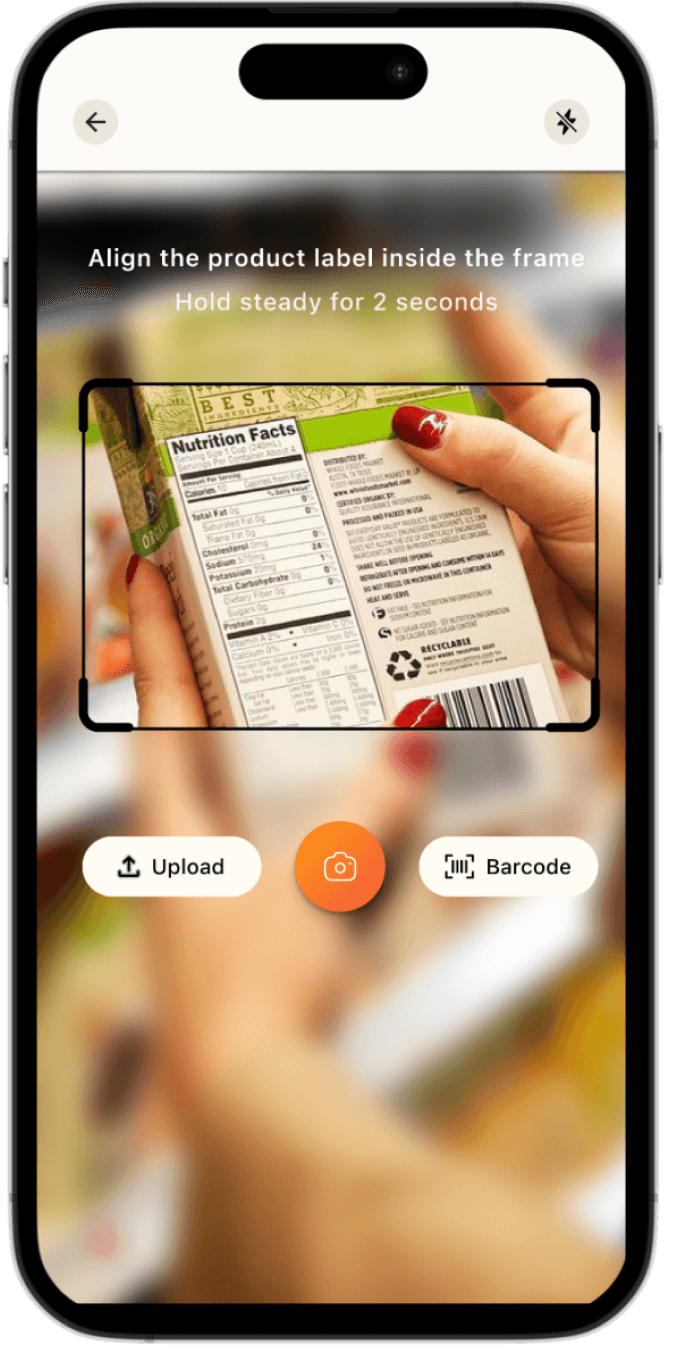
Scan
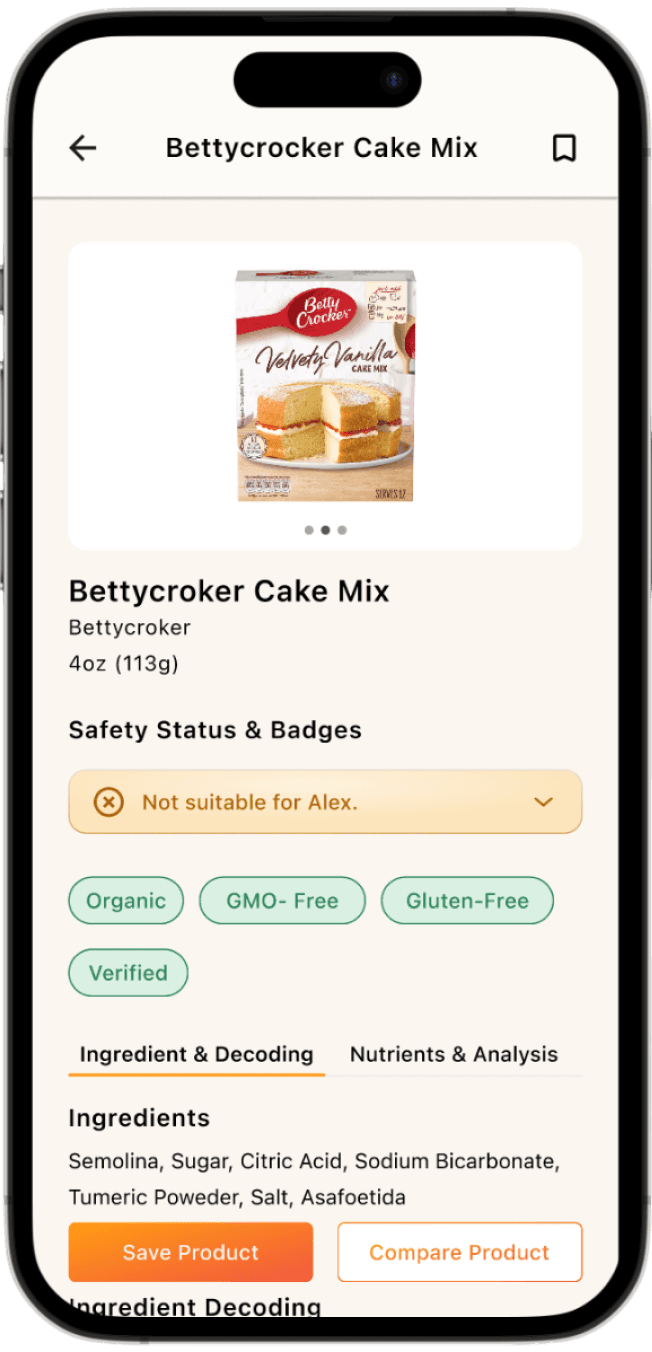
Product Detail
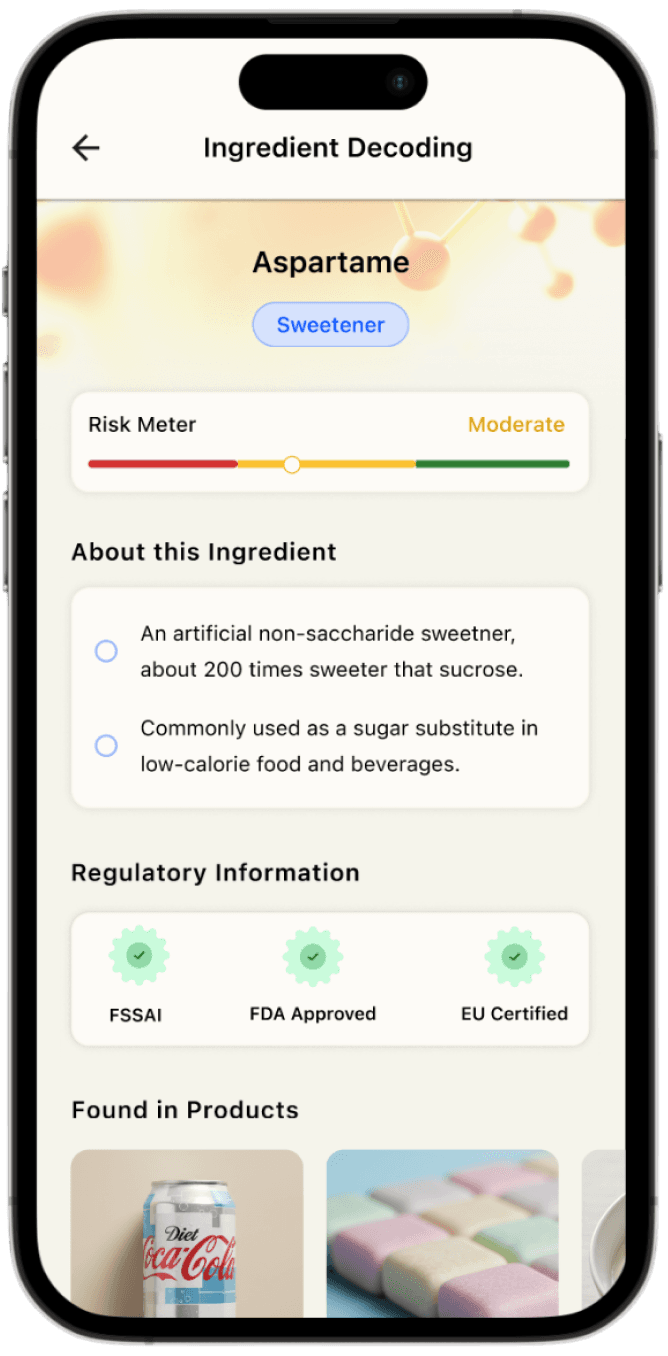
Ingredient Decode
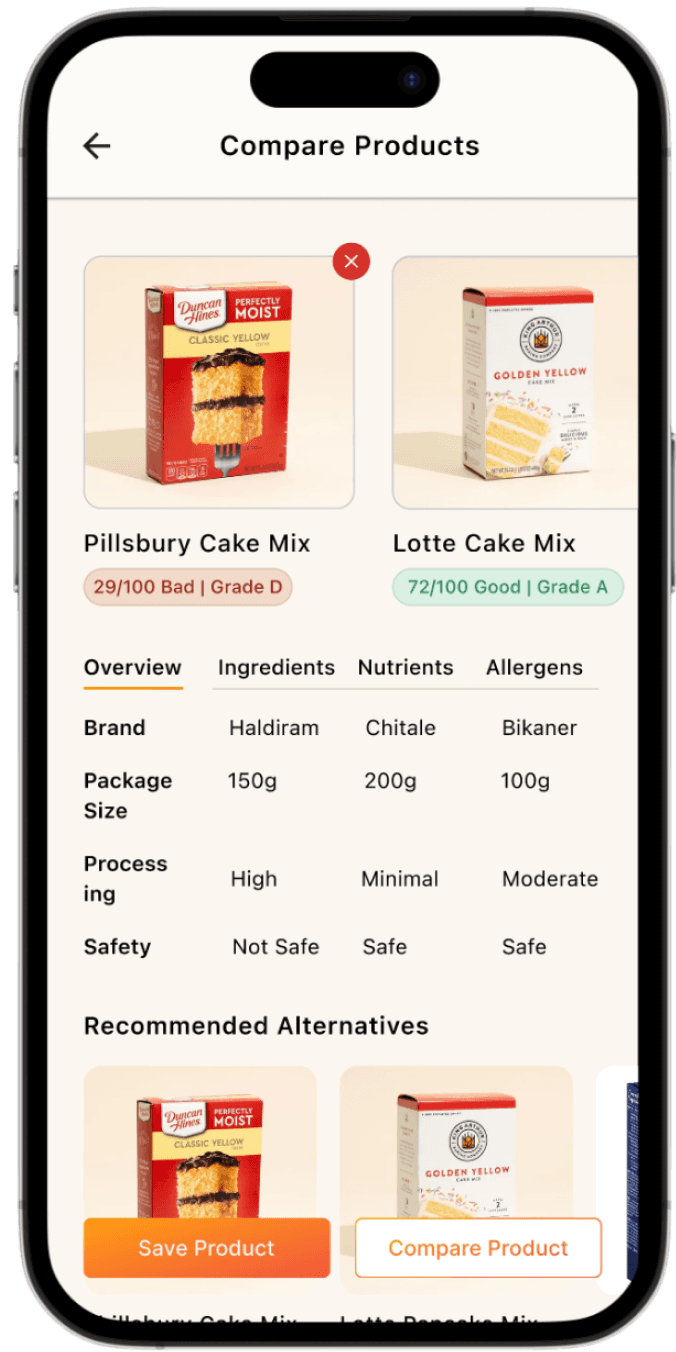
Compare
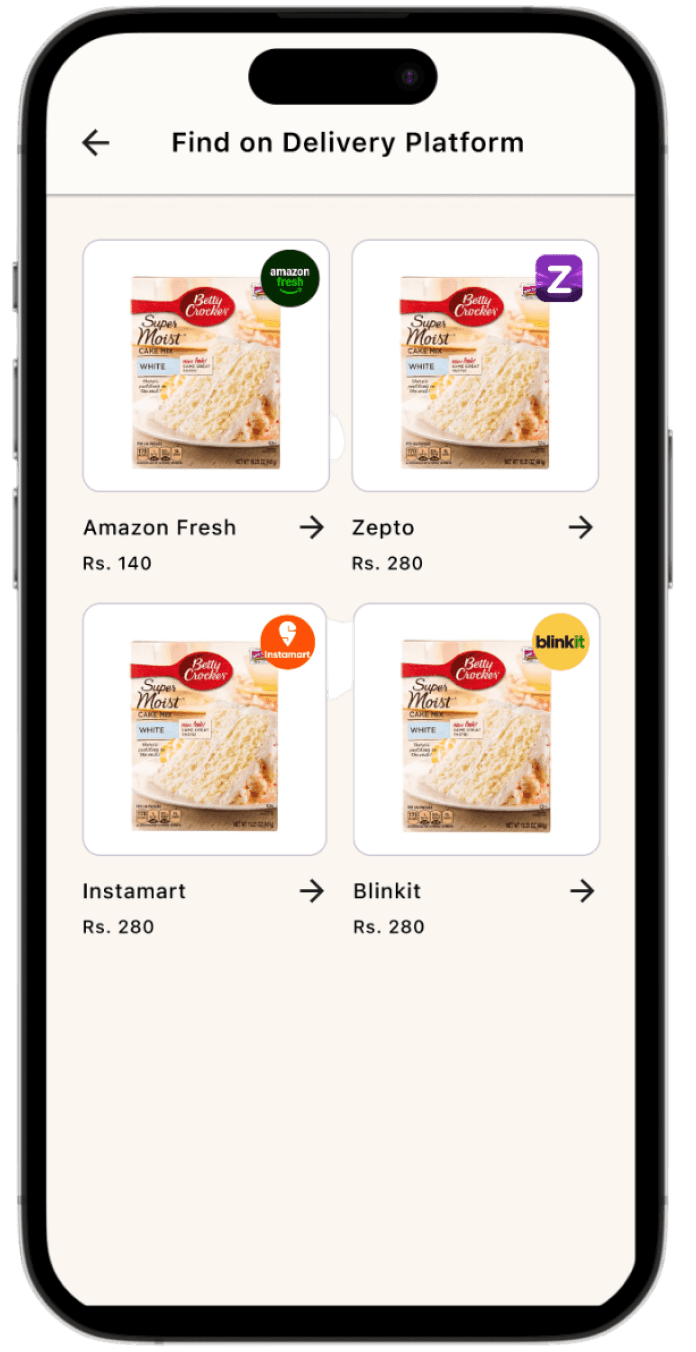
Find Online
07 Testing
Does it actually work?
Learnability testing was conducted with one participant — a 40-year-old housewife with moderate tech familiarity — completing the primary task flow three times. The task chosen was the full core loop: scan a product, decode ingredients, check safety, compare, find online, and save.
Attempt 1
35s
Learning begins — initial orientation, some hesitation at scan screen.
Attempt 2
24s
User gets faster — flow becomes familiar, fewer pauses.
Attempt 3
9s
Task mastered — confident, direct navigation with no hesitation.
Key Finding
74%↓
Reduction in task completion time from attempt 1 to attempt 3 demonstrating high learnability.
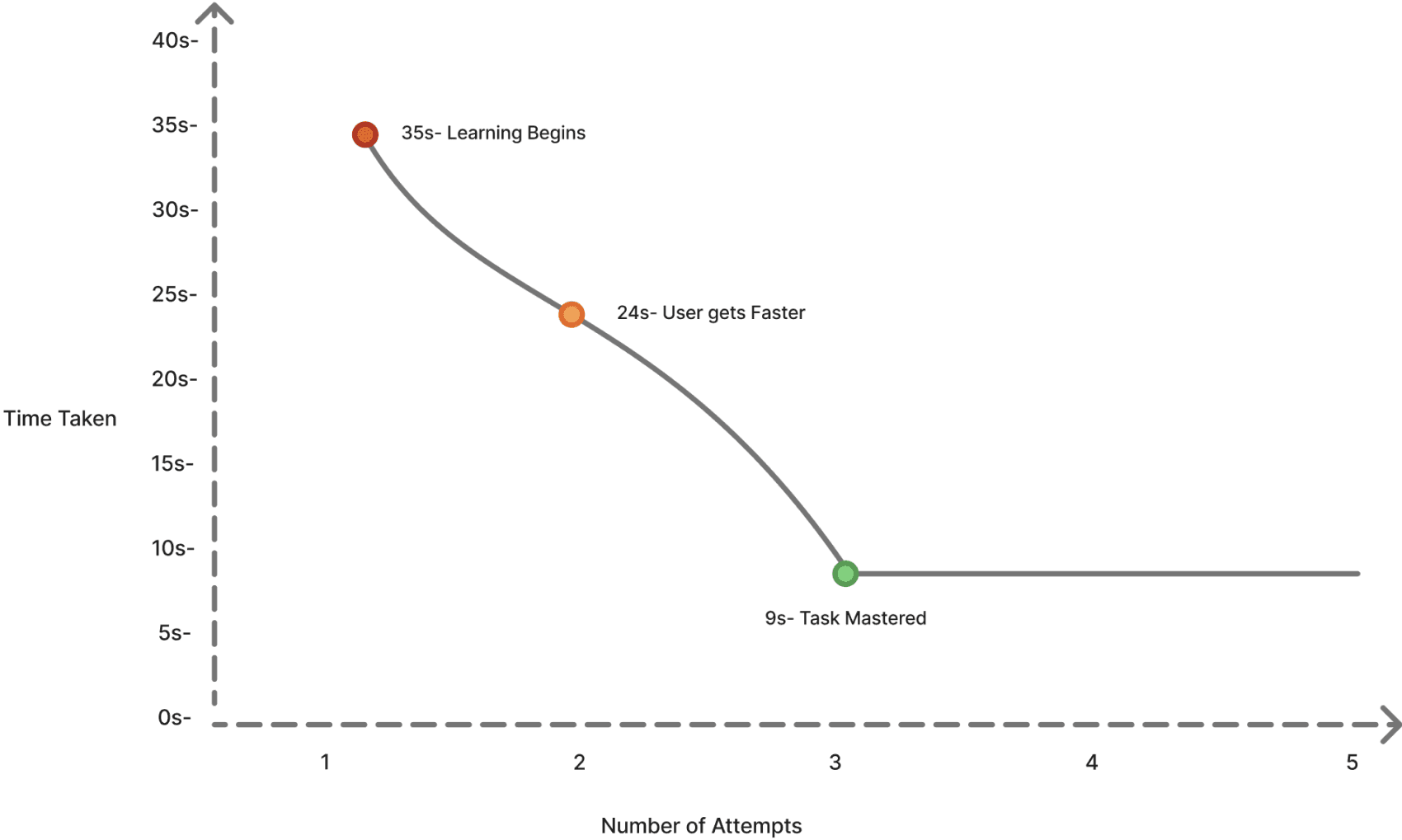
Task completion time dropped from 35 seconds to 9 seconds across three attempts — task mastered by attempt 3.
The steep improvement curve indicates the interface has high learnability — even for users with moderate tech familiarity. Testing with a broader participant group would strengthen these findings, but the initial signal is strong.
08 REFLECTION
What this project taught me.
NutriScan started with a statistic — 90% read, 30% understand — but what made it meaningful was tracing why that gap exists. It's not a user failure. It's a system that was never designed for understanding in the first place.
The most important design decision in this project wasn't a screen or a feature. It was framing the problem correctly — as a system coordination failure rather than a label comprehension problem. That reframe shaped every design choice that followed.
If I were to extend this project, I'd run usability testing with a broader participant group — particularly parents of young children, who face the highest stakes when label comprehension fails. I'd also explore how the app handles conflicting regulatory standards across product categories.
"When you design for understanding, you design for confidence.
That's what this app was really about."
Go Back Home